Participating Frequently
November 14, 2013
Answered

CS3 Install Error on new MacBook Pro w/Mavericks

  • November 14, 2013
  • 1 reply
  • 9532 views

I am attempting to install Illustrator from my CS3 Web Premium discs on a brand new 15" MacBook Pro/Retina. PhotoShop came over with Migration Assistant from my older MacBook Pro.

When I click "Setup" the instal starts but then I get a Startup Error "required resources missing".

It doesn't tell me what resources are missing so the only thing I can do is click "Quit".

Is there a fix for this?

Thanks!
This topic has been closed for replies.
Correct answer kglad

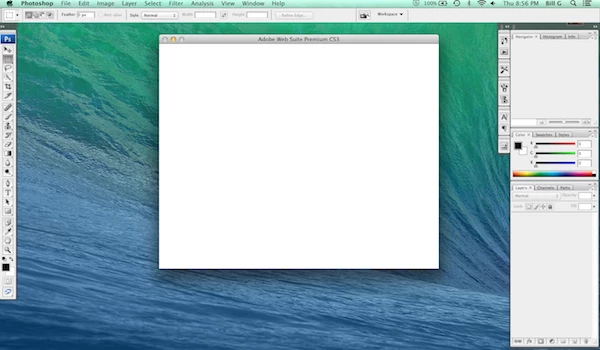
Believe it or not I got it to install from the discs. However, when I go to start PhotoShop the app starts up and then get's stuck when it loads the Adobe CS3 Start Screen (possibly an update screen).

I can't do anything except close the app. AND the only way to close it is Force Quit.

This is beyond frustration!

I've attached a screen shot of what I get when PhotoShop loads.

The only other thing I can do is click on the yellow (center) button in the center (start up/update/splash) screen. The other 2 buttons do not function. That just sends that screen to my dock but PhotoShop is still not usable.

I get the exact same results when I start up Illustrator.

Everything under the top menus is grayed out. The programs are totally unusable.


http://helpx.adobe.com/creative-suite/kb/blank-registration-screen-cs3.html

1 reply

kglad
Community Expert
Community Expert
November 14, 2013

uninstall what ever was installed (http://helpx.adobe.com/creative-suite/kb/remove-creative-suite-3-cs3.html)

run the cleaner, http://www.adobe.com/support/contact/cscleanertool.html

restart you computer.

then properly install cs3 using the install files.  DO NOT MIGRATE.

if you need the install files and if you follow all 7 steps you can dl a trial here:  http://prodesigntools.com/download-adobe-cs4-and-cs3-free-trials-here.html

and activate with your serial.

if you have a problem dl'g, you didn't follow all 7 steps.  the most common error involves failing to meticulously follow steps 1,2 and/or 3 (which adds a cookie to your system enabling you to download the correct version from adobe.com).

Participating Frequently
November 14, 2013

I don't need a trila version since I own the CS3 discs. I also have a CS4 upgrade that I never installed on my last computer.

If I understand you correctly, I should completely remove all of the CS3 applications from my new computer (the ones that moved over with Migration Assistant) and then start a clean install using my CS3 application disc.

Will this avoid the "required resources missing" issue?

My concern is loosing the ability to use PhotoShop (which is currently working) if for some reason, once removed, I can't instal it on this new machine. I use PhotoShop every day.

Thanks again!

kglad
Community Expert
Community Expert
November 14, 2013

I don't need a trila version since I own the CS3 discs. I also have a CS4 upgrade that I never installed on my last computer.

If I understand you correctly, I should completely remove all of the CS3 applications from my new computer (the ones that moved over with Migration Assistant) and then start a clean install using my CS3 application disc.

correct.

Will this avoid the "required resources missing" issue?

hopefully.

My concern is loosing the ability to use PhotoShop (which is currently working) if for some reason, once removed, I can't instal it on this new machine. I use PhotoShop every day.

that's a risk.

you could remove nothing and use your install disks to install whatever you want to add and see if that works.