Participant
August 13, 2018
Answered

CS4 install discs cloudy and not working properly

  • August 13, 2018
  • 1 reply
  • 716 views

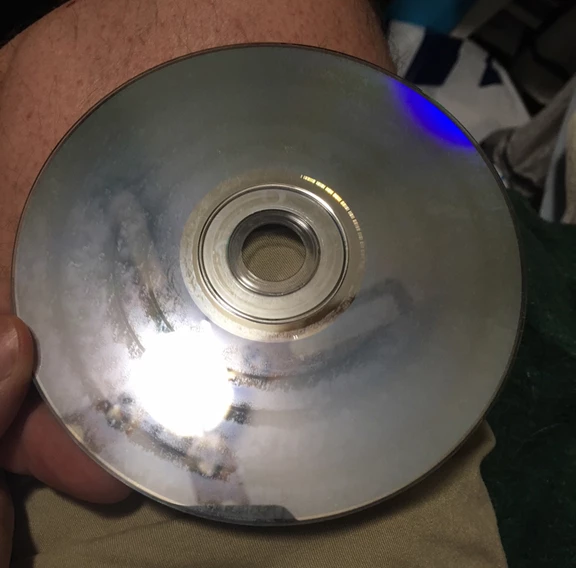
I bought the CS4 Production Premium years ago. It was right around the time CS5 was coming out, so Adobe offered CS5 upgrade discs for free. I just recently purchased a laptop and wanted to load the Production Premium onto it. When I pulled out the install discs that have been stored in the original plastic box they came in, I noticed the read side of the discs have all turned cloudy. No scratches, just cloudy. Upon installing, it gave me multiple read issues and I had to keep ejecting and starting over again because readability was difficult now that the discs are cloudy. Luckily, the CS5 upgrade discs were fine. I think because they were stored in sleeves inside the cardboard CS5 box, they held up. The CS4 discs were attached to plastic disc holders. I've attached a picture of one of the discs. The reflection is of my fan, but you can see the cloudiness spiraled around.

My question is can I receive replacement CS4 discs, or is there a downloadable DMG I can use, or is there a third alternative that will work as well?
Thanks for any help.
This topic has been closed for replies.
Correct answer John Waller

If you are reinstalling CS5 (upgrade version), there's no need to reinstall CS4 first.

Just install CS5 and enter your CS5 upgrade serial number.

Then enter your CS4 serial number when prompted to enter a serial number from an earlier qualifying product.

1 reply

John Waller
Community Expert
John WallerCommunity ExpertCorrect answer
Community Expert
August 13, 2018

If you are reinstalling CS5 (upgrade version), there's no need to reinstall CS4 first.

Just install CS5 and enter your CS5 upgrade serial number.

Then enter your CS4 serial number when prompted to enter a serial number from an earlier qualifying product.

Participant
August 13, 2018

Perfect! Being CS5 were upgrade discs, I wasn't 100% sure if I could do it that way (if the full application lived on the upgrade discs), but that really is the easiest fix. I knew there had to be a third alternative. Thanks for the help, John. I'll try that next time.

John Waller
Community Expert
Community Expert
August 13, 2018

Yes, the full application is on all Adobe discs.

The serial number distinguishes a full version from an upgrade.