jeffk97282248
Participant
October 11, 2016
Answered

CS6 Design Standard - Installer failed to initialize

  • October 11, 2016
  • 2 replies
  • 664 views

Hi - I am trying to get a copy of CS6 Design Standard installed on my Macbook Pro running macOS Sierra (10.12).  After running the installer I get the following error message:
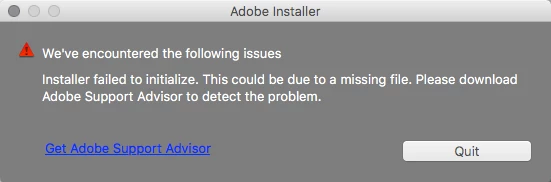
When I click the URL, I get a page that says that the log analyzer is no longer supported.  Any ideas on how I can get this installed?

Thanks

This topic has been closed for replies.
Correct answer Bani Verma

Hi Jeffk97282248,

With the release of macOS 10.12 (Sierra), many of the Creative Suite installers may not function normally, for details on how to resolve installation issues on macOS Sierra, please refer to: Installing Creative Suite on macOS 10.12 (Sierra).

Let us know if this helps.

2 replies

Govardhan.V
Participating Frequently
October 11, 2016

Just in case , If you continue to get same error , you may remove Adobe Application Manager manually and reinstall the same .

Restart Mac.

Step 1)

Click on the Finder and look for the options listed next to Apple Icon located at the top left corner of the Desktop screen and click on "Go" menu button and select "Utilities" option.

(Applications>Utiliites)

Locate  Adobe Application Manager folder under Utilities  and trash it.

Step 2 )

Click on the below link and download Adobe Application Manager and install the same :

http://download.adobe.com/pub/adobe/creativesuite/cc/mac/ApplicationManager10.0_all.dmg

Once the installation process is completed, installation box will disappear, then open Application folder and locate Adobe Application manager launch icon , double click on it and update .

Once the update is completed. It shud launch Adobe Creative Cloud app.

Quit Adobe Creative Cloud app.

Then try to install CS 6 again .

Bani Verma
Bani VermaCorrect answer
Legend
October 11, 2016

Hi Jeffk97282248,

With the release of macOS 10.12 (Sierra), many of the Creative Suite installers may not function normally, for details on how to resolve installation issues on macOS Sierra, please refer to: Installing Creative Suite on macOS 10.12 (Sierra).

Let us know if this helps.

jeffk97282248
Participant
October 13, 2016

Thanks for your help.  Your solution worked fine.  Much appreciated.