
Participant
February 27, 2018
Answered

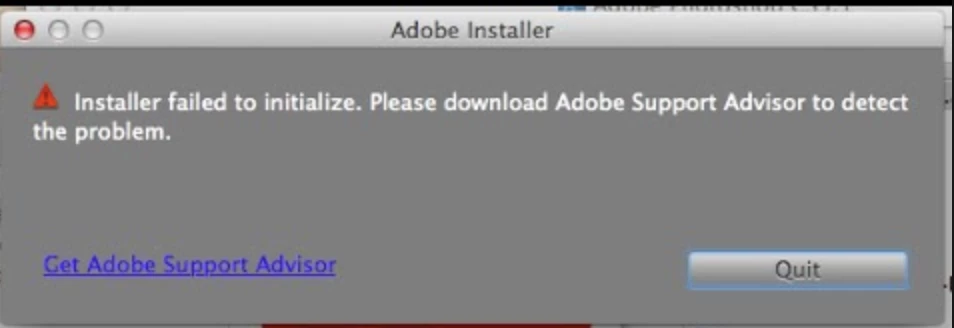
CS6 Installer failed to initialize Please download Adobe Support Advisor to detect the problem - Mac Sierra

  • February 27, 2018
  • 3 replies
  • 25265 views

SOLUTION for Mac-Sierra Installation:

1. Right-click (or Control-click) on the installer (RED icon) and choose Show Package Contents.

2. In the Install window that opens in the Finder, go to the Contents/MacOS folder, and in there, double-click Install. That will open the Terminal application, some lines of code will automatically run, and the actual Installer should successfully launch.

Shout out to: Ajinkya Borade

Holy F adobe. Why do I have to download more bloatware to initiate the installer? Ridiculous. It's bad enough my PC version has an unremovable and running application in my task bar. And, I can never get any work done because the GD acrobat application is jumping rope every 2 days in my dock for some update. Does the product manager even use this stuff?
This topic has been closed for replies.
Correct answer unique-screen-name23

Nope - Adobe software is compatible. It's the installer that is broken. How hard is it to make a note in the zip to open the terminal script? It should take someone there all of 5 minutes to put that note in there in a readable format. It would have saved me a couple of hours reading through half baked solutions in the forum. Ultimately, I found the answer as a comment to a you tube video (that also had it wrong).

I believe it is an incentive problem at the heart of it - The math: $CS6 + $CC > $CS6

SOLUTION for Mac-Sierra Installation:

1. Right-click (or Control-click) on the installer (RED icon) and choose Show Package Contents.

2. In the Install window that opens in the Finder, go to the Contents/MacOS folder, and in there, double-click Install. That will open the Terminal application, some lines of code will automatically run, and the actual Installer should successfully launch.

"helpx" is no where to be found...

3 replies

Participant
September 11, 2018

THANK YOU !!!

THANK YOU !!!

THANK YOU !!!

That worked !!!

Participant
April 12, 2018

I am having the same problem loading CS6 on a new iMac with High Sierra. I worked that it will accept downloads from any where. My problem is that when I try this: Right-click (or Control-click) on the installer (RED icon) and choose Show Package Contents. When I right click the installer icon, it doesn't give me the menu to choose show package contents, it just keeps opening and won't install because of a missing file. Please help!

Participant
April 13, 2018

Turns out, you can't right click the install icon, you have to control click it. Ugh!

Participant
June 7, 2018

Hi all! I would like to add my thanks to the "show package" solution.

However, I was not able to launch the installer from the Contents/MacOS folder simply by double-clicking. I had to launch Terminal and DRAG the installer file into the Terminal window. Success — at least as far as installing, launching and creating a new file goes. More later as I put the CS5.5 though its paces.

There's a helpx page on this, written for 10.12, but it seems to work with 10.13: Installing Creative Suite on macOS 10.12 (Sierra)

This whole problem came to light when one of my co-workers accidentally upgraded to High Sierra. We had purchased ID CS4 for everyone (affordable, permanent), which works fine with Sierra, but completely dissolves under High Sierra. Hard way to find out!

SPEC'S: I'm running a late 2010 Mac Mini with 8GB RAM, macOS High Sierra.

kglad
Community Expert
Community Expert
February 27, 2018

the problem is sierra (os 10.12) and high sierra (os 10.13) are not compatible with older software.  register a complaint with apple, too.

adobe's posted a work-around which you seem to no longer need:  https://helpx.adobe.com/creative-cloud/kb/install-creative-suite-mac-os-sierra.html

unique-screen-name23AuthorCorrect answer
Participant
February 28, 2018

Nope - Adobe software is compatible. It's the installer that is broken. How hard is it to make a note in the zip to open the terminal script? It should take someone there all of 5 minutes to put that note in there in a readable format. It would have saved me a couple of hours reading through half baked solutions in the forum. Ultimately, I found the answer as a comment to a you tube video (that also had it wrong).

I believe it is an incentive problem at the heart of it - The math: $CS6 + $CC > $CS6

SOLUTION for Mac-Sierra Installation:

1. Right-click (or Control-click) on the installer (RED icon) and choose Show Package Contents.

2. In the Install window that opens in the Finder, go to the Contents/MacOS folder, and in there, double-click Install. That will open the Terminal application, some lines of code will automatically run, and the actual Installer should successfully launch.

"helpx" is no where to be found...

Participant
April 12, 2018

Thank you. I did install it that way with the work around because it failed to initialize. My fonts are still pixelated even after the re-install. It's not a small font issue on the screen as suggested above. The fonts are not rendering properly. When I use other applications - like MS Word or PPT, the fonts are clean and crisp.