roberta13288480
Participant
June 2, 2017
Answered

CS6 - MSVCR100.dll was not found

  • June 2, 2017
  • 1 reply
  • 12200 views

Today In-Design CS6 would not start - MSVCR100.dll was not found. On restating computer the CS6ServiceManager could not start-System Error with same file not being found.

This topic has been closed for replies.
Correct answer Srishti Bali

Hi roberta,

If I get your query correctly , while launching InDesign is giving error "MSVCR100.dll is missing" ?

Please try repairing Microsoft visual C++ 2012, 2013 and 2015

Close InDesign and other Adobe applications.

Go to Control Panel >Programs and Features

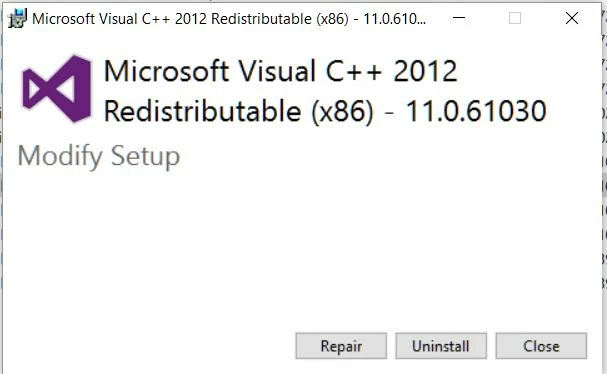
Double click Microsoft Visual C++ 2012 Redistributable (x86)

it will give you options for repair , click on repair

do this one by one for

Microsoft Visual C++ 2012 Redistributable (x64)

Microsoft Visual C++ 2013 Redistributable (x86)

Microsoft Visual C++ 2013 Redistributable (x64)

Microsoft Visual C++ 2015 Redistributable (x86)

Microsoft Visual C++ 2015 Redistributable (x64)

then go to location

C:\Users\username\AppData\Roaming\Adobe and

C:\Users\username\AppData\local\Adobe

and delete in-design folders(this will remove all the preferences and workspaces for Indesign)

then reboot the system , and launch ID from CC

Regards

Srishti

1 reply

Srishti Bali
Community Manager
Srishti BaliCommunity ManagerCorrect answer
Community Manager
June 2, 2017

Hi roberta,

If I get your query correctly , while launching InDesign is giving error "MSVCR100.dll is missing" ?

Please try repairing Microsoft visual C++ 2012, 2013 and 2015

Close InDesign and other Adobe applications.

Go to Control Panel >Programs and Features

Double click Microsoft Visual C++ 2012 Redistributable (x86)

it will give you options for repair , click on repair

do this one by one for

Microsoft Visual C++ 2012 Redistributable (x64)

Microsoft Visual C++ 2013 Redistributable (x86)

Microsoft Visual C++ 2013 Redistributable (x64)

Microsoft Visual C++ 2015 Redistributable (x86)

Microsoft Visual C++ 2015 Redistributable (x64)

then go to location

C:\Users\username\AppData\Roaming\Adobe and

C:\Users\username\AppData\local\Adobe

and delete in-design folders(this will remove all the preferences and workspaces for Indesign)

then reboot the system , and launch ID from CC

Regards

Srishti

roberta13288480
Participant
June 5, 2017

You are correct - while launching, InDesign is giving error "MSVCR100.dll is missing"

Your answer must be out of date - all the links give messages that the downloads are no longer available.

Please check your suggestions before posting - PROBLEM NOT FIXED.

Robert

roberta13288480
Participant
June 5, 2017

I'm running on Windows 10 - is this the cause of the problem??