
Participant
February 8, 2017
Question

Deactivating Photoshop CS3

  • February 8, 2017
  • 2 replies
  • 697 views

I'm trying to deactivate a copy of Adobe Design Standard CS3 from one computer so that I can activate it on another laptop. The problem is, I don't see exactly where to do it. When I look under the Help Menu, all I see is this...
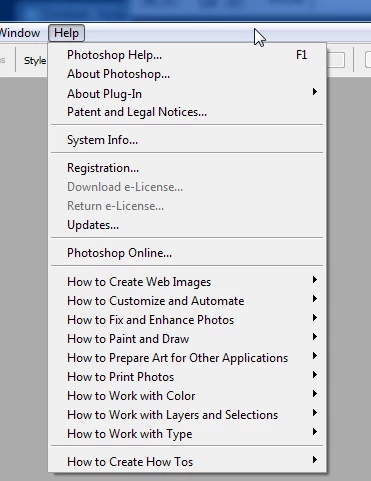
When I look under "Help | Photoshop Help..." and search for "deactivate," here's what I get...
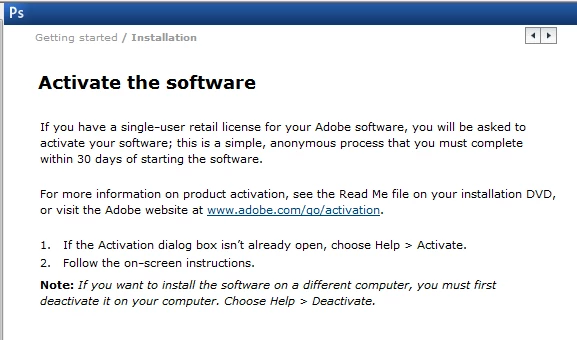
Where's "Deactivae?"

    This topic has been closed for replies.

    2 replies

    John Waller
    Community Expert
    Community Expert
    February 8, 2017

    The first screenshot looks like a Volume Licensed version.

    Adobe - E-licensing

    Participant
    February 8, 2017

    Ahh. It looks like you can't transfer Educational Versions of Adobe software. Thanks for the assistance.

    John Waller
    Community Expert
    Community Expert
    February 8, 2017

    To transfer is to transfer the license (serial number) from one Adobe ID to another. That cannot be done with an EDU version.

    Transfer an Adobe product license

    I understand that you want to deactivate the software on one computer and install and activate it on another. That's certainly possible. No restrictions on the EDU version for that.

    Do you have an EDU version or a Volume Licensed version?

    Mohit Goyal
    Community Manager
    Community Manager
    February 8, 2017