
Participant
December 11, 2018
Question

Device activation limit | CC 2019

  • December 11, 2018
  • 2 replies
  • 698 views

I use two computer. Office and home.

When I turn on my office computer Adobe recognize two computer. So It opens deactivate page.
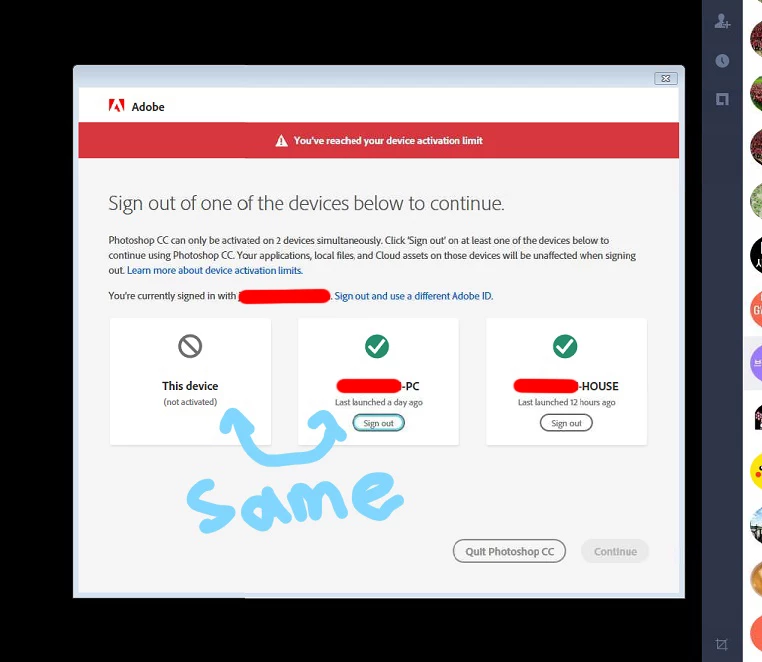
LIke this. what can I do for solve the problem?

It is so annoying.

[Moderator edited private information out of the picture.]

This topic has been closed for replies.

2 replies

shawn_starc
Inspiring
December 26, 2018

Click on sign out and sign in again. If you have creative cloud desktop application. Then Sign out and Sign in again. This may will resolve the issue

Ned Murphy
Legend
December 11, 2018

HAve you tried signing out of the machine you indicate as being the same and then tried activating (the same machine)?

woomkAuthor
Participant
December 26, 2018

Of course, I reboot the PC after logout and use it, Adobe shows that problem.. :<

Abambo
Community Expert
Community Expert
December 26, 2018

What happens when you sign ot the middle one?

ABAMBO | Hard- and Software Engineer | Photographer