
Difficulties Updating Lightroom 6.x
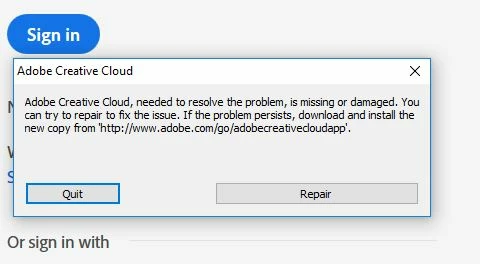
I have three Lightroom-related questions: When one is just using LR 6.x, are the updates handled on the computer by Adobe Application Manager, Adobe Creative Cloud App or both? The dialog box shown in the screenshot attached wants to install or repair the latter of the two. Since Adobe has re-branded many things related to LR with CC in their name, I am trying to understand what and why the above dialog box is trying to correct, and what it plans on doing to repair the problem. My assumption is at least the latter of the two programs is required and the dialog box is offering to reinstall or repair it. Is this a correct assumption?
And, when I go to the Adobe site to download the updates for LR 6.x and down load the update, I open and unzip a file named AdobePatchInstaller.exe. When I click on this exe file, I get an Adobe error box labeled “Update Failed.” This box report that “Adobe Application Manager may be damaged. Download and install a new copy of Adobe Application Manager.
When I look on the Adobe site for the Adobe Application Manager download, the Adobe advice is that the Adobe Application Manager is for the purpose of installing or managing the Cloud and CC Classic subscription programs. Can it be used to update my 6.x “perpetual” license or is it a device to suck me into committing to a subscription version of Lightroom?
 AdChoices