
Participant
November 2, 2018
Answered

Difficulty downloading using Safari

  • November 2, 2018
  • 1 reply
  • 226 views

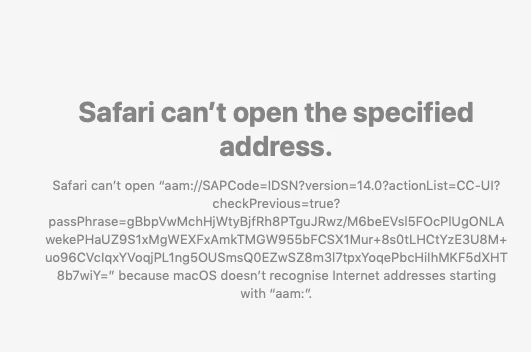
I'm trying to reinstall my InDesign application and when I click 'Download', it get the screen below.   

This started when I went to open my InDesign package that has been working fine for years, and it said something was wrong and wouldn't let me open it, so I signed in as instructed and it took me to my profile but it was all in greek letters.  I deleted my InDesign application thinking there was something wrong with it (I wish I hadn't) and now I can't reinstall.  Any ideas welcome.  thank you.
This topic has been closed for replies.
Correct answer kglad

install the cc desktop app from here https://creative.adobe.com/products/creative-cloud and use it to install your adobe subscription and trial programs.

[ moved from Downloading, Installing, Setting Up to Creative Cloud Download & Install]

1 reply

kglad
Community Expert
kgladCommunity ExpertCorrect answer
Community Expert
November 2, 2018

install the cc desktop app from here https://creative.adobe.com/products/creative-cloud and use it to install your adobe subscription and trial programs.

[ moved from Downloading, Installing, Setting Up to Creative Cloud Download & Install]