Participating Frequently
June 24, 2013
Question

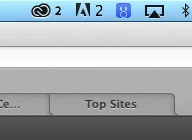
Double Adobe Updaters in my menubar, can't disable old one…

  • June 24, 2013
  • 7 replies
  • 7028 views

I have the new creative cloud menu item on my Mac. This is fine.

I also have the old adobe cs6 updater menu item on my mac. Normally I just open the CS6 Adobe Application Manager and disable it.

However if you try to open this file, it opens the new creative cloud updater, which OBVIOUSLY has no option to turn off this infernal old Adobe menu…

Help how can I get the double menu bar out now, that Adobe takes over the old app?
This topic has been closed for replies.

7 replies

jaybee_uk
Participating Frequently
June 26, 2015

It showed up for me again recently, I have an install of Premiere Pro CS6 which needed updating. Updated that and it vanished again.

Make sure you update older Adobe software and it should disappear.

Participant
August 4, 2015

This is not an elegant option if you are still using Fireworks which has no CC version.

May 16, 2015

Today, I posted an updated guide to remove the adobe updater from the OS X menu bar with creative cloud:

Remove the Adobe Updater from Your Menu Bar - Jeff Reifman

Participant
June 18, 2015

I tried to use your guide except when I click on the updates... button in photoshop I just get directed to creative cloud. I have yet to figure out a way to launch adobe updater.

Participant
September 19, 2015

Me too. This is frustrating.

jaybee_uk
Participating Frequently
October 24, 2014

I know this is an old thread, but I had the same issue. Solved by removing an old version of Acrobat Pro. If you get the old Adobe updater icon as well as the CC one, make sure you remove / update any older apps.

Participant
October 27, 2014

Bingo! Thank you jayvee_uk. Same problem, same solution. Worked like a charm. I had an old version (X) of Acrobat. Uninstalled. Problem fixed. I did have to restart CC, but all good now. Thanks!

Participant
July 17, 2013

I thought it didn't solve it...

However, if you have been using Adobe CC since it came out in June or early July,

just need to update "Creative Cloud" that is on the menu bar.

I realized taht you need to log out and log in Creative Cloud will give you a update warning of "Creative Cloud" update)

Then the icon will disappear!

Participating Frequently
June 25, 2013

The trick appears to be logging out/logging back in from CC menu, it updates CC menu software, removes Adobe Updater. So far so good…

Jeffrey_A_Wright
Legend
June 24, 2013

If you log out and back in then the notification should be removed.

Participating Frequently
June 25, 2013

No it doesn't stay gone. The old CS6 menu came back when I woke up my computer.

Can somebody at Adobe please help. Even if I have to force delete the CS6 updater from my computer. I want the icon gone from my menu bar even if it means I won't be old to update Adobe CS6 software in the future.

Jeffrey_A_Wright
Legend
June 25, 2013

Have you applied the updates which you are being notified of?