

Inspiring
March 20, 2019
Question

Double app versions in CC installer

  • March 20, 2019
  • 1 reply
  • 925 views

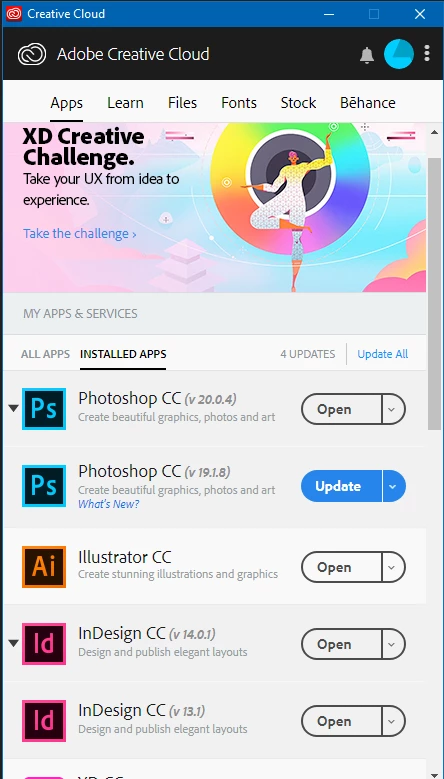
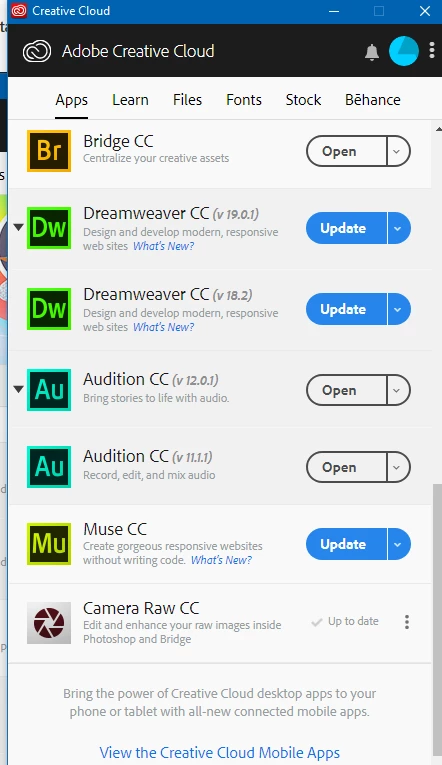
Why do I have duplicate apps in my installer list with different version numbers? As you can see it occurs with PS, IN, DW and Audition. I don't really see why this is happening?
This topic has been closed for replies.

1 reply

Abambo
Community Expert
Community Expert
March 20, 2019

You may have opted during the installation to keep the old version. That's common. I do that all times to be able to keep a working version for my WIP.

Look here to get rid of the additional versions: Re: Both 2018 and 2019 CC programs installing on my computer

ABAMBO | Hard- and Software Engineer | Photographer
perrybrusAuthor
Inspiring
March 20, 2019

But that's weird cause I used to be able to roll back on the same app icon before if I needed to. Now there's additional list items in the installer instead and they are constantly throwing prompt messages telling me there are newer versions, while in fact thy are older versions not re-installed! This whole CC system is driving me nuts. This is just one of numerous issues I'm experiencing with CC.

Abambo
Community Expert
Community Expert
March 20, 2019

perrybrus  wrote

But that's weird cause I used to be able to roll back on the same app icon before if I needed to. Now there's additional list items in the installer instead and they are constantly throwing prompt messages telling me there are newer versions, while in fact thy are older versions not re-installed! This whole CC system is driving me nuts. This is just one of numerous issues I'm experiencing with CC.

Uninstall what you do not need. Or Update what is marked for update -- and yes, there are still (security) updates rolling out for 2018 versions.

ABAMBO | Hard- and Software Engineer | Photographer
