Participant
November 13, 2013
Question

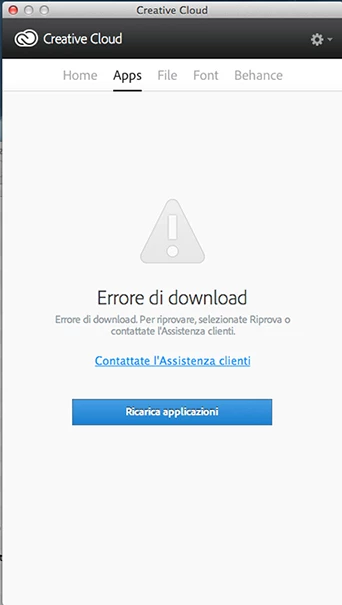
Download error in the Apps section of Creative Cloud desk

  • November 13, 2013
  • 2 replies
  • 606 views

I also tried to reinstall the program, but the same error appears and says to contact the customer service, how do I fix this?
This topic has been closed for replies.

2 replies

Participant
November 25, 2013

If all this still doesn't work: check the security setting in the C:Program Files (x86)/Common Files/Adobe folder. When you've installed CC while you were signed in on your microsoft account instead of your local administrator account on your PC Adobe creates the default software folder without full control. What helps:

  1. uninstall CC
  2. Restart your computer
  3. Run the Adobe Cleaner (http://helpx.adobe.com/creative-suite/kb/cs5-cleaner-tool-installation-problems.html)
  4. Rename the users/myname/appdata/local/Adobe/AAMUpdate folder to AAMUpdat.old (it's a hidden folder)
  5. Rename the users/myname/appdata/local/Adobe/ OOBE folder to OOBE.old
  6. Navigate to C:Program files(X86)/Common files/Adobe folder and rightclick to the security settings. Assign full control rights to the user of the PC
  7. Reinstall CC Desktop
Participating Frequently
November 14, 2013

I'm having this same issue.  I updated the Creative Cloud App on Mac OSX Mavericks today and now the App section shows this same screen shot Mick77 posted.

Mick77Author
Participant
November 14, 2013

Hello you managed to solve this problem?

I have many problems with Adobe CC with Illustrator, has trouble making copying and pasting, and I formed the shadows raster; sometimes I have trouble duplicating with the ALT key + increase measurement ...