Participant
February 8, 2018
Answered

Download Lightroom 6

  • February 8, 2018
  • 2 replies
  • 16706 views

Hi,

I just bought Lightroom 6 and got a CD as well as a serial. Given that my Mac doesn't support CDs I searched for an installer.

But there is none. On Download Photoshop Lightroom there is now download available. Can someone help as this is super annoying...

Thanks,

Thomas

This topic has been closed for replies.
Correct answer kglad

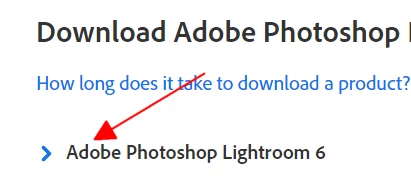
do you see this:

if so, click the blue arrow or the adjacent text.

if not, use a different browser.

2 replies

Rob_Cullen
Community Expert
Community Expert
October 31, 2021

"the link seems not working anymore." -That was in 2018!!

This is now the only source for v6.14- ProDesignTools kindly offers a download link that is for Lr v6.14 (Perpetual)-

There is no telling how much longer Adobe will allow this link to work. https://prodesigntools.com/adobe-lightroom-6-cc-direct-download-links.html

Time you considered the Photography Plan (20GB)  that will upgrade you to v11 of Lightroom-Classic.  ($9.99 PHOTOGRAPHY PLAN (USA)

Lr  v6.14 is now well past End-of-Life!

No support is available from Adobe.

Lr v6.14 cannot be installed on any Mac OS later than Mojave.

Some functions in Lr6.14 now do not work- (eg. Maps, Face recognition).

Activation reset (for maximum 2 installs) is becoming very difficult and can only be done by contact with Adobe Staff via a Chat box (link below). You need to be logged in to an ADobe Account and allow cookies in your Browser and make sure that your browser does NOT block ads, scripts, or pop-ups. You will need your Serial Registration Number. You must ask ONLY for “Activations Reset”. If you ask for “Support” there is no answer.

 https://helpx.adobe.com/contact.html?rghtup=autoOpen

Any recent purchase (eg. eBay) is possibly Malware contaminated.

A 'Private' purchase will require from the 'seller' a "Transfer of Licence" from Adobe.

Adobe does NOT do support by email, so beware of answering anyone who sends you a private message. For more information about scammers https://tinyurl.com/10791730


Regards. My System: Windows-11, Lightroom-Classic 15.1.1, Photoshop 27.3.1, ACR 18.1.1, Lightroom 9.0, Lr-iOS 10.4.0, Bridge 16.0.2 .
kglad
Community Expert
Community Expert
February 8, 2018

Single user licensee downloadable installation files available:


Updates

  • Download and installation help for Adobe links

  • Download and installation help for Prodesigntools links are listed on most linked pages.  They are critical; especially steps 1, 2 and 3.  If you click a link that does not have those steps listed, open a second window using the Lightroom 3 link to see those 'Important Instructions'.

And a big thank you to Jim @ Prodesigntools for helping me with these links!

Participant
February 9, 2018

Thanks for the quick reply!

But the link leads to the same page where I was and there no download button is available. Any other option? Thanks, Thomas

kglad
Community Expert
kgladCommunity ExpertCorrect answer
Community Expert
February 9, 2018

do you see this:

if so, click the blue arrow or the adjacent text.

if not, use a different browser.