
Answered
Downloaded AE 13.8 but it won't open. Anyone know why?
I just keep getting this error message-
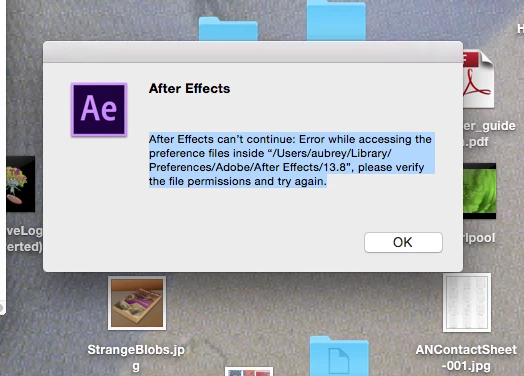
Anyone know what this means? Also the old version of AE CC still shows up in my App folder, unlike all the other apps I recently updated.
I just keep getting this error message-
Anyone know what this means? Also the old version of AE CC still shows up in my App folder, unlike all the other apps I recently updated.
I'm sorry but nothing seems to be working anymore.
I downloaded the uninstaller and uninstalled the CC app, downloaded a new installer, double clicked the installer it says "downloading creative cloud app" then the window disappears and nothing happens. Nothing opens, the app doesn't show up anywhere, no error message.
Up until the other day I had had zero problems with any of these apps.
Hi Aaubreyn39480500,
As you have tried the basic steps for "Exit Code: 123" and now Creative Cloud app is disappearing while downloading. I would request you to check the gatekeeper settings and select "Anywhere" option which is found at this path "Apple menu > System Preferences… > Security & Privacy > General" under the header "Allow applications downloaded from:"
Let me know if this helps.
Thanks.
Already have an account? Login
Enter your E-mail address. We'll send you an e-mail with instructions to reset your password.
 AdChoices