
erinv24800726
Participant
September 21, 2016
Answered

Downloading CS5 Design Premium onto a new Mac

  • September 21, 2016
  • 2 replies
  • 956 views

I have the disks for my CS5 Design Premium but on my new mac there is no CD drive. I have tried multiple times to download the CS5 Design Premium "file 1 of 1" for the mac but every single time it tells me that it cannot be read and must eject it. I have the serial numbers for the program. I also have my old computer and also external hard drives. Is there a way to transfer my program to my new computer? I need this for work ASAP, please help!

Thanks

Erin
This topic has been closed for replies.
Correct answer gener7

erinv24800726 wrote:

I have the disks for my CS5 Design Premium but on my new mac there is no CD drive. I have tried multiple times to download the CS5 Design Premium "file 1 of 1" for the mac but every single time it tells me that it cannot be read and must eject it.

The problem is that CS5 was released before OSX's heightened security setting. It causes this misleading error because it is not "signed" as a trusted app and therefore is blocked.

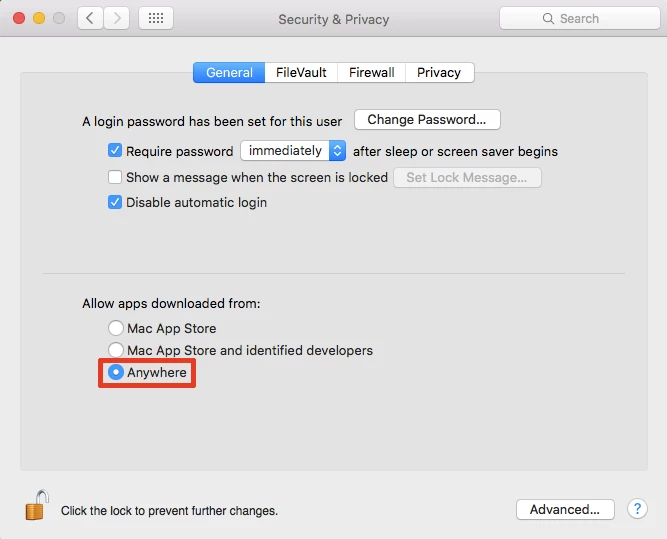
You have to go to your Security & Privacy in Apple System Preferences, and temporarily set it to Anywhere before opening the DMG, installing and updating. After it's all done, set it back to Mac App Store and identified developers.

2 replies

gener7
Community Expert
gener7Community ExpertCorrect answer
Community Expert
September 21, 2016

erinv24800726 wrote:

I have the disks for my CS5 Design Premium but on my new mac there is no CD drive. I have tried multiple times to download the CS5 Design Premium "file 1 of 1" for the mac but every single time it tells me that it cannot be read and must eject it.

The problem is that CS5 was released before OSX's heightened security setting. It causes this misleading error because it is not "signed" as a trusted app and therefore is blocked.

You have to go to your Security & Privacy in Apple System Preferences, and temporarily set it to Anywhere before opening the DMG, installing and updating. After it's all done, set it back to Mac App Store and identified developers.

January 18, 2017

I tried this earlier, and my Mac still would not open the CS5 file.

gener7
Community Expert
Community Expert
January 18, 2017

What version of OSX do you have?

Can you post a screenshot of the error message?

Gene

John Waller
Community Expert
Community Expert
September 21, 2016

Have you tried downloading from this alternate, safe download site?

Download Adobe CS5 Free Trials – All Direct Links without Akamai | ProDesignTools

Follow the Very Important Instructions on that page before you click the download links.