


Participant
June 9, 2026
Answered

Downloading registered product Master Collection 6 give wrong .exe file

  • June 9, 2026
  • 3 replies
  • 21 views

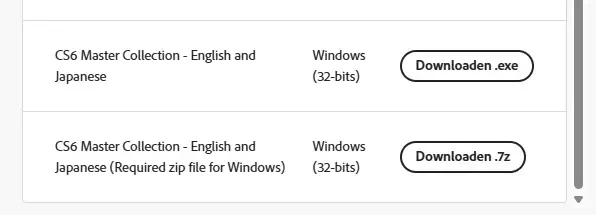
From my registered products under my account, I'm trying to download the English version of the Adobe Master Collection (English).
For that you need to download a “.7z” file and assosiated “.exe” file.
On my page, for alle languages both match, except for English.
That should give a “MasterCollection_CS6_LS16.7z” and “MasterCollection_CS6_LS16.exe”, but instead the .exe is for another language pack (MasterCollection_CS6_LS4.exe)

ANy idea where I can get the correct .exe file ?


    Correct answer BartVels

    Renaming the 7Z file to LS4 did fool the installer … weird setup from Adobe

    3 replies

    BartVelsAuthorCorrect answer
    Participant
    June 9, 2026

    Renaming the 7Z file to LS4 did fool the installer … weird setup from Adobe

    Jeff_A_Wright
    Community Manager
    Community Manager
    June 9, 2026

    I appreciate the feedback, ​@BartVels


    Our current offerings do use a vastly different delivery mechanism.


    I recommend backing up the extracted files in case you need them later.

    Jeff_A_Wright
    Community Manager
    Community Manager
    June 9, 2026

    Thank you for your long-term use of our software, ​@BartVels. Do you encounter problems downloading the files for any of the other software titles that are registered under your account?


    MasterCollection_CS6_LS16.exe is the execution component of the self-extracting archive, ​@BartVels. You can also use your favorite compression program that supports the 7zip format to extract the files inside. You will need to manually launch Setup.exe after extraction is complete.


    There are multiple methods of saving 7zip files, ​@BartVels, so try a different utility if the first one you use is unsuccessful. I haven’t tried extracting the files with Windows 11, so it may even have built-in support in 2026.


    Sorry for the inconvenience. Please see 

    for more information about downloading older Adobe software titles.

    kglad
    Community Expert
    Community Expert
    June 9, 2026

    what happens when you run the exe in the same folder with the 7z?

    BartVelsAuthor
    Participant
    June 9, 2026

    Says it cannot find the associated 7z file

    kglad
    Community Expert
    Community Expert
    June 10, 2026

    @BartVels 


    did you try unpacking the 7z file (in a folder with no other apps)?