
Participating Frequently
August 30, 2020
Question

Email Support available? [Unable to download Photoshop using Windows 8.1]

  • August 30, 2020
  • 4 replies
  • 588 views

Are there real peopel i can email to, who can repoly back?

the Chat robot doesnt work well

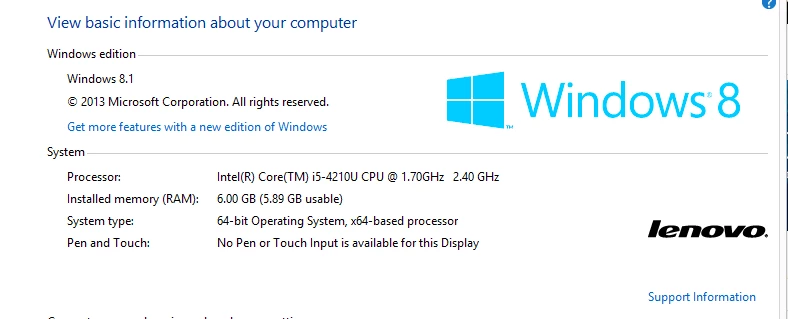
I have screenshot I'dlike yo share


Problem: can't get download button wotk for Photoshop with error System is not good or something

Wanted to show it's pretty good system in fact


Also, Why no option to dwnload earlier versions then?
 

This topic has been closed for replies.

4 replies

Community Expert
August 31, 2020

Because the software you are trying to get hold of does not work on Win8, i have postulated all the scenarios for you in my previous post. If you don't like the suggestions then i am sorry to say it won't work for you. Better look for alternatives

-Manan

-Manan
Community Expert
August 30, 2020

There are multiple things to tackle here, downloading a supported older version will not help you as your system does not meet the hardware and the software specification to use the software. The following needs to be done

  • You need to either upgrade to Win 10 or Win 7, refer the documentation for exact details
  • You need to upgrade your RAM to at least 8GB, 16GB for a smooth experience

Without fulfilling the above criteria nothing is gonna work, even if you get the software somehow it will not install. Now regarding Creative Cloud application, that is a required component either install it specifically or it will automatically be installed when you try to download an application. The concept of downloading installer packages is gone for Creative Cloud applications.

As John mentioned, if you are not a paid customer you cannot access the previous versions and if you want to try then that is available only for the latest version, not the older versions.

If you are still insistent on trying your luck then you can download the CC2018 version, probably compatible with your computer using the following link

https://prodesigntools.com/adobe-cc-2018-direct-download-links.html

Do note that the installer will be downloaded from the Adobe servers and if the links don't work then that means no genuine copy of this version exists, don't fall trap to people on the internet providing a download. Also, Adobe officially does not recommend using this version so if anything goes wrong, if you find any bugs or issues then you are on your own, don't expect updates to this version. 

-Manan

-Manan
vdezAuthor
Participating Frequently
August 31, 2020

I have Win 8 64 bit, Why I see you suggesting me go Win 7?

It is not possible for me to get Win10 on this machine, sorry wont work

Legend
August 31, 2020

Windows 7 and Windows 8 are dead.  But Windows 8 is dead for many years, while Windows 7 is only dead a few months and some CC apps still run with Windows 7. But it sounds as if you have an obsolete machine no use for current software. 

John Waller
Community Expert
Community Expert
August 30, 2020

>>>Wanted to show it's pretty good system in fact


That's a very old system with not enough RAM (only 6GB. 8GB is recommended) and an unsupported operating system.


Time to upgrade.

vdezAuthor
Participating Frequently
August 30, 2020

I see a relevant post https://community.adobe.com/t5/download-install/i-want-to-use-an-earilier-version-of-after-effects/td-p/9522575?page=1 saying there should be a menu of different versions available for dwnload

However I don't have that menu  showing

Community Expert
August 30, 2020

I gave the link in my post on how to install previous versions, did you look at it? As i mentioned only two latest versions are supported by Adobe for download and both of them are not compatible with your computer so that might be a reason that you don't see the versions, in case you are following the instructions full and still not seeing the options

-Manan

-Manan
Community Expert
August 30, 2020

Hi There,

The issue that I see from your screenshot is the OS version, Win 8 is not supported, the last version supported for this OS is CC2018. I would suggest you upgrade to Win 10 if you can.

See the minimum system requirements at

https://helpx.adobe.com/photoshop/system-requirements.html

There is no email support as far as I know. You can talk to a real human via chat, follow the process listed below.

Login to your account and navigate to the URL below. Make sure that the browser has cookies enabled, and all script blockers are disabled.
https://helpx.adobe.com/contact.html
Click on the chat icon on the bottom right, and type AGENT to avoid bots and talk to a human.
Also, be mindful of answering anyone who sends you a private message. See the following for more information about scammers
https://tinyurl.com/y7cfrr7y

Adobe supports the download of only two latest versions of an app using the Creative Cloud app, for instructions see the following link.

https://helpx.adobe.com/download-install/using/install-previous-version.html
-Manan

-Manan
vdezAuthor
Participating Frequently
August 30, 2020

So you say there's no Photoshop version I can use wiht Win8?

Sucks

John Waller
Community Expert
Community Expert
August 30, 2020

Photoshop will not run on Windows 8.1 but Photoshop Elements 2020 will.


Any reason for not upgrading to Windows 10? You could then try running a 7 day trial version of Photoshop.