Participant
April 26, 2020
Answered

Embed Spark into Adobe Portfolio site [Topic edited for clarity]

  • April 26, 2020
  • 10 replies
  • 4385 views

Hi Guys,

I've  made website using Spark and wanted to publish it on my website made in My Portfolio. When I embed code got info that code is incorrect. What is the problem?

Michal

This topic is closed to new replies. Start a new post to keep the conversation going.
Correct answer Nancy OShea
Hi Nancy,

It works but not as I want to work. It isn't full screen and can't do it 😞

Michal

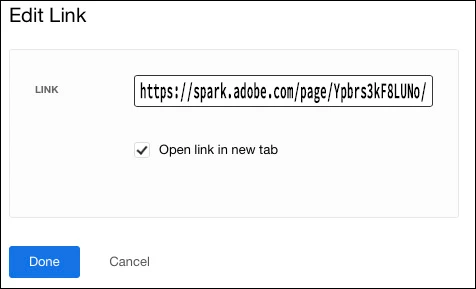
Right.  Your Spark page is too big to fit inside a Portfolio page.  I think it's a better experience if you add a direct outbound link from Portfolio to your Spark page.  See screenshot.


10 replies

Nancy OShea
Community Expert
Community Expert
April 26, 2020

Hi Wilczur_Photo,

Adobe Portfolio only accepts embed code that is inside an <iframe>.  See example code below. 


It goes without saying that your Spark page (xxx) needs to be online for this to work.


<iframe src="https://spark.adobe.com/page/xxx/embed.html" width="512" height="256"></iframe>


Post back if have any questions.


Nancy O'Shea— Product User & Community Expert
Participant
April 27, 2020

Hi Nancy,

Please find out my code. Is it ok?


<script id="asp-embed-script" data-zindex="1000000" type="text/javascript" charset="utf-8" src="https://spark.adobe.com/page-embed.js"></script><a class="asp-embed-link" href="https://spark.adobe.com/page/Ypbrs3kF8LUNo/" target="_blank"><img src="https://spark.adobe.com/page/Ypbrs3kF8LUNo/embed.jpg?buster=1587969040660" alt="Wilczur Photo" style="width:100%" border="0" /></a>


Regards

Michal

Nancy OShea
Community Expert
Community Expert
April 27, 2020

No, Michal.  I don't know where you obtained that code but it won't work with Adobe Portfolio. 


You must use an <iframe> like this:

<iframe src="https://spark.adobe.com/page/Ypbrs3kF8LUNo/" width="512" height="256"></iframe>


Or insert a screenshot and add an outbound link to your Spark Page. 


Nancy O'Shea— Product User & Community Expert