gwenm47570985
Participant
October 15, 2017
Answered

Endless validating license loop during start-up of CC app

  • October 15, 2017
  • 3 replies
  • 2602 views

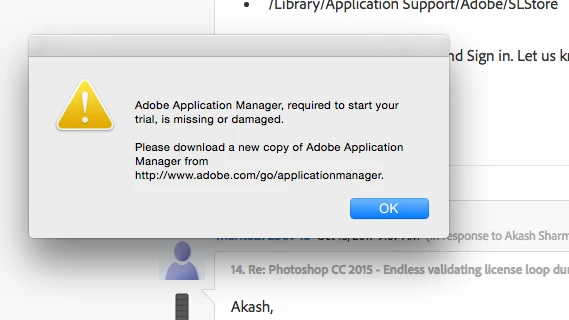
I am having the same issues. I am also on a Mac. I am trying to do some work from home. If I go into work Monday and have the same issue it is not going to be good. I did the above mentioned and when I go to re open Illustrator this is the message I get.

This topic has been closed for replies.
Correct answer Govardhan.V

If you haven't tried below steps , try once:

Open Applications>Utiliites.

Locate Adobe Creative Cloud and Adobe Application Manager folder under Utilities window and trash both folders.

Step 2)

Trash Adobe Creative Cloud folder from Applications as well.

Step 3)

1) Right click on Finder icon and  select "Go-ToFolder " option.

2) You will get a text box, type-in below command and then hit 'Return' key.( Do not miss ~ symbol)

~/library

3)Then navigate to Application Support>Adobe.

Open Adobe folder and trash folders named AAMUpdater and OOBE.

Step 4)

1) Right click on Finder icon and  select "Go-To" Folder option.

2) You will get a text box, type-in below command and then hit 'Return' key.

/library

3)Then navigate to Application Support>Adobe.

Open Adobe folder and trash folders named AAMUpdater ,Adobe Application Manager and OOBE.

Step 5)

Click on the below link and download & run Adobe Cleaner tool :

If present remove Creative Cloud app /Adobe Application Manager.

http://download.macromedia.com/SupportTools/Cleaner/mac/AdobeCreativeCloudCleanerTool.dmg

Step 6 )

Click on the below link and download Adobe Application Manager and install the same :

http://download.adobe.com/pub/adobe/creativesuite/cc/mac/ApplicationManager10.0_all.dmg

Once the installation process is completed, installation box will disappear, then open Application folder and locate Adobe Application manager launch icon , double click on it and update .

Once the update is completed. It shud launch Adobe Creative Cloud app.

3 replies

Bani Verma
Legend
October 16, 2017

Hi Gwenm47570985,

As you have mentioned you are getting an message while trying to use a CC app, this can happen if the Creative Clou desktop app is damages or not up to date hence I would recommend you to try the troubleshooting steps given in the following help document: Adobe Creative Cloud, needed to resolve this problem, is missing or damaged.

Let us know if this helps.

gwenm47570985
Participant
October 16, 2017

I have uninstalled the CC app and re downloaded multiple times as well as removing the folders in the Library that were suggested in another post. It still doesn't work.

Govardhan.V
Govardhan.VCorrect answer
Participating Frequently
October 16, 2017

If you haven't tried below steps , try once:

Open Applications>Utiliites.

Locate Adobe Creative Cloud and Adobe Application Manager folder under Utilities window and trash both folders.

Step 2)

Trash Adobe Creative Cloud folder from Applications as well.

Step 3)

1) Right click on Finder icon and  select "Go-ToFolder " option.

2) You will get a text box, type-in below command and then hit 'Return' key.( Do not miss ~ symbol)

~/library

3)Then navigate to Application Support>Adobe.

Open Adobe folder and trash folders named AAMUpdater and OOBE.

Step 4)

1) Right click on Finder icon and  select "Go-To" Folder option.

2) You will get a text box, type-in below command and then hit 'Return' key.

/library

3)Then navigate to Application Support>Adobe.

Open Adobe folder and trash folders named AAMUpdater ,Adobe Application Manager and OOBE.

Step 5)

Click on the below link and download & run Adobe Cleaner tool :

If present remove Creative Cloud app /Adobe Application Manager.

http://download.macromedia.com/SupportTools/Cleaner/mac/AdobeCreativeCloudCleanerTool.dmg

Step 6 )

Click on the below link and download Adobe Application Manager and install the same :

http://download.adobe.com/pub/adobe/creativesuite/cc/mac/ApplicationManager10.0_all.dmg

Once the installation process is completed, installation box will disappear, then open Application folder and locate Adobe Application manager launch icon , double click on it and update .

Once the update is completed. It shud launch Adobe Creative Cloud app.

Akash Sharma
Legend
October 16, 2017

Hi gwenm,

I've branched out this discussion from Photoshop CC 2015 - Endless validating license loop during start-up. Any Solutions?! since you are getting a loop of  "Validating licensing" while using Photoshop CC.

Also, I am moving this discussion to Downloading, Installing, Setting Up​ where experts will help you out.

Thanks,

Akash

gwenm47570985
Participant
October 16, 2017

Well, now all I am able to download is the Illustrator trial? I have a Creative Cloud account why can I not download the full version? This is ridiculous.