
Participant
September 8, 2018
Answered

Erro ao instalar o creative cloud

  • September 8, 2018
  • 3 replies
  • 768 views

Meu computador estava muito lento e resolvi desinstalar tudo e instalar novamente, então desinstalei todos os programas adobe e exclui a pasta da adome do disco local c, limpei ele todo e agora quando vou instalar o creative cloud aparece isso
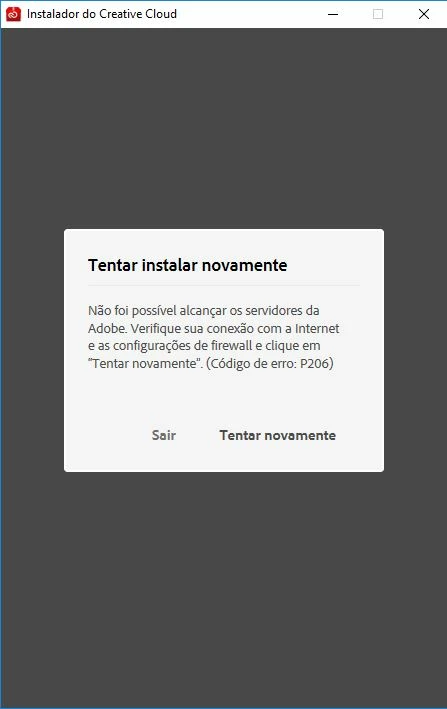
E eu ja fiz os procedimentos padrões, ja desinstalei tudo, ja baixei também aquele programa da adobe que exclui todos os arquivos da adobe do seu pc, ja usei o ccleaner e tbm já reiniciei meu pc, e nada de resolver, preciso de ajuda urgente, tenho muitos trabalhos pra fazer.

This topic has been closed for replies.
Correct answer DelphiZoa

Sorry to hear that Theushm. If you've taken all the standard troubleshooting steps, then it is probably time to get one-on-one technical assistance via chat or phone, which is what is ultimately suggested in a couple of the threads Axel Matt links. Go to the following page to access these options Contact Customer Care​.

3 replies

Kanikas
Legend
September 20, 2018
AxelMatt
Community Expert
Community Expert
September 8, 2018
My System: Intel i7-8700K - 64GB RAM - NVidia Geforce RTX 3060 - Windows 11 Pro 25H2 -- LR-Classic 15 - Photoshop 27 - Nik Collection 8 - PureRAW 6 - Topaz Photo AI
DelphiZoa
Participating Frequently
September 8, 2018

Hello Theushm,


Code P206 is a connectivity error. Have you tried all the solutions in this help document: Resolve connection errors with Adobe Creative Cloud and Creative Suite applications​?

If you use those steps to confirm you can connect with Adobe's activation servers, but you are still unable to install, try reinstalling the Creative Cloud desktop app using an administrator account. Instructions for doing so are under Solution 4 in this help document: Adobe Creative Cloud, needed to resolve this problem, is missing or damaged​.

Let us know if that helps or if you need further assistance.

Participant
September 8, 2018

Já fiz tudo isso e continua o problema.

DelphiZoa
DelphiZoaCorrect answer
Participating Frequently
September 8, 2018

Sorry to hear that Theushm. If you've taken all the standard troubleshooting steps, then it is probably time to get one-on-one technical assistance via chat or phone, which is what is ultimately suggested in a couple of the threads Axel Matt links. Go to the following page to access these options Contact Customer Care​.