


Answered
Error 0xc000012f appears anytime on Windows 10 Pro 64 bit latest version since I installed the latest version of Adobe Acrobat Reader Free
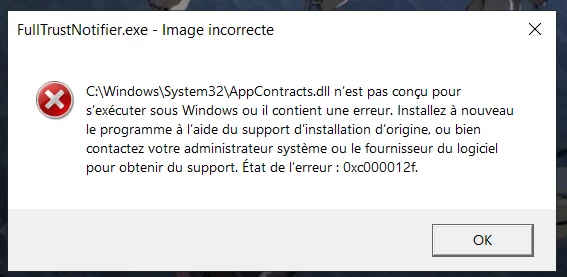
Here is a screenshot of the windows pop-up error message appearing anytime (every 10 minutes non-stop) since I installed Adobe Acrobat Reader DC Free version (directly from the Microsoft Store) on my Windows 10 Pro 64 bit version 22H2 (as local admin, personal computer).
Translation from french:
“FullTrustNotifier.exe - incorrect image - C:\Windows\System32\AppContracts.dll is not ment to run under Windows or contains an error. Install the application again with the help of the genuine installation support or contact your sysadmin or the software editor to obtain support. Status of the error: 0xc000012f.”
Is this error known and what am I supposed to do to make it disappear?
Thank you for your support!

 AdChoices