
Participant
March 27, 2012
Answered

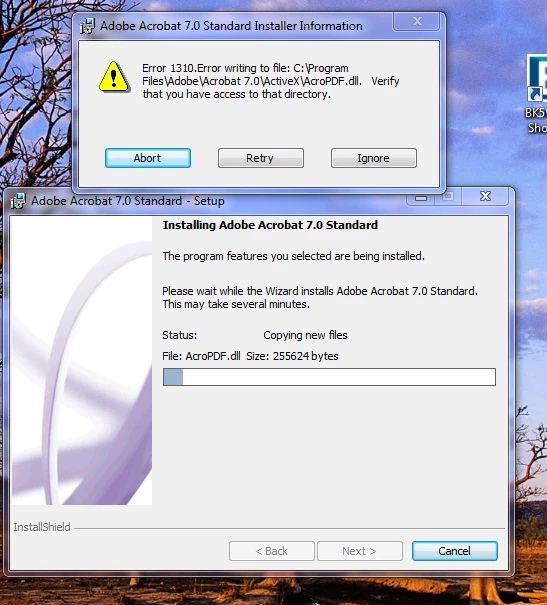
Error 1310. Unable to update / repair / install

  • March 27, 2012
  • 2 replies
  • 18931 views

For over a week, on start up of my computer Adobe Acrobat tries to do an update - and fails due to " error 1310. Error writing to file: C:\Program Files\Adobe\Acrobat 7.0\ActivX\AcroPDF.dll. Verify that you have access to that directory "

But on cancelling - program worked fine.

Today - same error but now Adobe Acrobat will not open citing serial number error.

I tried to repair using the install disk - same Error 1310

I then uninstalled Adobe Acrobat

Then I tried to re-install - same error 1310.

Adobe reader runs OK

But I need the acrobat.
This topic has been closed for replies.
Correct answer John Beecher

Unable hidden admin account on your computer

look on the link for details :- http://www.howtogeek.com/howto/windows-vista/enable-the-hidden-administrator-account-on-windows-vista/

then login in the administrator account and run the installer.


Thankyou so much.

For some reason I could not get the forum to do an reply.

It worked but not they you thought.

I did the administrator thing – but it still bombed out with same error.

I went back into the folder and tried to delete what was there – but could not due to “permissions” – so I renamed it AAA.

Then I did then install – but this time instead of my initials for the user & business labels + serial number, I put in administrator for the user, initials for the business name + serial number – and it worked.

I don’t know if it was the renaming of the activX folder (though nothing was is in it) or the administrator name on the registration page – but it worked and all is OK with my world again.

Thanks for your help.

Leanne for John Beecher.

2 replies

tanaw20419748
Participant
April 30, 2015

I had a similar problem, and after 3 days of frustration trying all suggestions had a look at the folders, tried to delete the ActiveX folder but it wouldn't let me... so I renamed the Acrobat 7.0 folder to "dead". Then tried installing it again and it worked, no problems.

Participant
March 7, 2016

It worked.

Inspiring
March 28, 2012

1) You can give permission at the folder "c:\program files\adobe\acrobat7.0\activeX\acropdf.dll"

2) You can click on ignore and countinue your installation.

Participant
March 28, 2012

Sounds the simple answer but after I uninstalled program the folder was deleted - so adobe is creating the folder but not letting me access??

Also I tried the ignore - kept coming up - and would not install.

Inspiring
March 28, 2012

Unable hidden admin account on your computer

look on the link for details :- http://www.howtogeek.com/howto/windows-vista/enable-the-hidden-administrator-account-on-windows-vista/

then login in the administrator account and run the installer.