
Participant
May 10, 2017
Answered

Error 16 on Adobe message box?

  • May 10, 2017
  • 2 replies
  • 666 views

HI Technical Expert Adobe,

I want to ask currently i cannot login to adobe there is an "error 16" on adobe message box. I try to follow the solution that you publish on the internet (https://helpx.adobe.com/creative-cloud/kb/configuration-error.html) but there is a new message, you can see on the picture below.
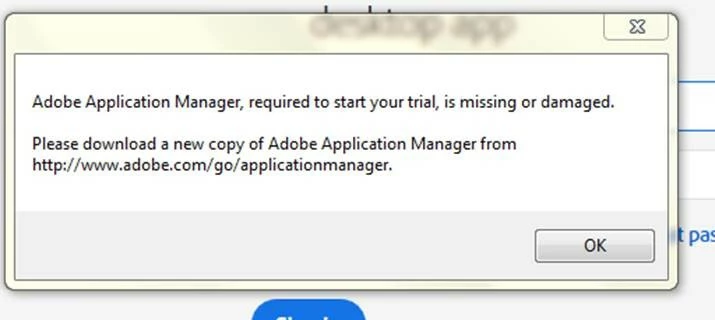
and Then I restart my laptop there is a new error like the picture below.
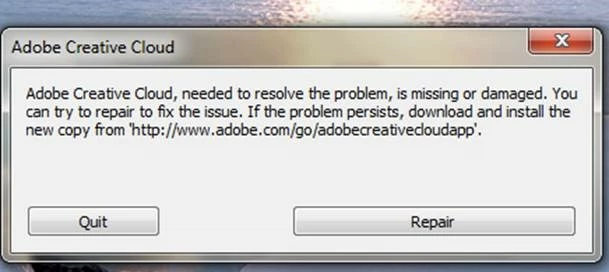
Honestly I'm tired there always an error like this but there is no final solution.

Please advise.

Thanks and Best Regard !

This topic has been closed for replies.
Correct answer arij2010

Hi,

Configuration errors mean that your machine prevent the apps from accessing some folders .

You can test this to fix both configuration and Creative cloud desktop issue :

Quit All Apps and Adobe processes from task manager .

Delete these folders :

C:\Program Files (x86)\Common Files\Adobe\OOBE

C:\Program Files (x86)\Common Files\Adobe\SLCache

C:\ProgramData\Adobe\SLStore

C:\Users\<your name>\AppData\Local\Adobe\OOBE

C:\Users\<your name>\<votre nom>\AppData\Local\Adobe\AAMUpdater

install creative cloud desktop again

2 replies

Sheena Kaul
Legend
May 10, 2017
arij2010
arij2010Correct answer
Inspiring
May 10, 2017

Hi,

Configuration errors mean that your machine prevent the apps from accessing some folders .

You can test this to fix both configuration and Creative cloud desktop issue :

Quit All Apps and Adobe processes from task manager .

Delete these folders :

C:\Program Files (x86)\Common Files\Adobe\OOBE

C:\Program Files (x86)\Common Files\Adobe\SLCache

C:\ProgramData\Adobe\SLStore

C:\Users\<your name>\AppData\Local\Adobe\OOBE

C:\Users\<your name>\<votre nom>\AppData\Local\Adobe\AAMUpdater

install creative cloud desktop again

Participant
June 8, 2017

Hi,

I did and i think it's not a final solution. Because it happens again. Is there any fixed solution about this?

Thanks and Keep SMile

Aditya

Jeffrey_A_Wright
Legend
June 8, 2017

Aditya if the file permissions on your computer continue to be compromised then please review the use of any installed security software or optimizers that may be affecting the file permissions. 

If you are unable to locate the misconfigured security software then I would encourage you to backup any critical files and reinstall Windows.  Once complete then please be especially cautious of any software you install which could lead to the file permissions being adjusted .