brendonb59475490
Known Participant
July 6, 2016
Answered

Error 160 while installing Photoshop CC 2015.5

  • July 6, 2016
  • 5 replies
  • 13754 views

When trying to install Photoshop I receive the error 160 code. I have checked the registry permissions to ensure full access but it still doesn't work. Any ideas on how I can fix this?

This topic has been closed for replies.
Correct answer Govardhan.V

I have already allowed full control in registry however i could not find photoshop.exe

I am using windows 10 64bit


Run Adobe Cleaner tool and  if present remove Adobe Photoshop cc.  [ Do not select Clean all option  , it will remove all installed Adobe apps ]

http://download.macromedia.com/SupportTools/Cleaner/win/AdobeCreativeCloudCleanerTool.exe

Navigate to C:> Program Files > Adobe.

If present rename or delete Adobe Photoshop CC folder.

Optional step:  Run any registry/PC Cleaner tool to remove invalid reference registry keys or unnecessary left over remnant files created while attempting to install app.

Follow below steps carefully :

In the Windows search text box type as CMD , it will provide search results :

Important : Right click on " Command Prompt"   option and select " Run as Administrator"  option .

It will open Command Prompt window in elevated mode.

Step 2)

Now copy below command then right click on Command Prompt black screen window and select Paste option and press Enter key.

net user administrator /active:yes
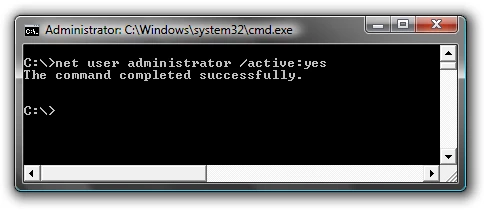
You should see a message that the command completed successfully.

Step 3)

Restart the computer and login to user account named " Administrator"  and then try to install Photoshop cc again .
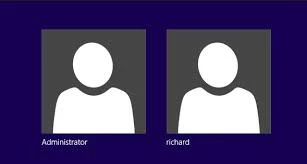
Note :

To disable Hidden Admin account  you can follow above same steps and use below command .

net user administrator /active:no

5 replies

Participant
September 9, 2018

This worked for me. It's not clear from the images, but what these steps do is allow you to make the administrator profile available to you by turning it on in the Command function, then install, then turn it off in Command, and then log back in normally.

Inspiring
August 23, 2016

isn´t it a sad joke through how many loops you must jump before you get the software you have payed for to run?

adobes crappy installers and the cloud BS creates nothing but trouble.. and now they even got rid of the offline installers.

Participating Frequently
August 29, 2016

I'm still stuck with this same problem. I have tried all of the above.

I have also tried uninstalling everything including Creative Cloud Desktop, using the Adobe cleaner app to clean ALL. Rebooting, logging in using hidden administrator account, re-installing everything, changing registry permissions etc.

I have also tried talking to Adobe Support. They spent ages remote controlling my PC trying to figure it out but have still failed to get Photoshop working. And personal cost... I have lost many hours to this problem so far.

Support eventually concluded that there must be a bug in Windows 7 (x64) and I need to get help from Microsoft!

Really? Is that the best Adobe can do?

And the registry key that it claims is causing the failed install is not anything crucial... it's just an raw file extension open association - why should that break the whole install? I can even write the same registry key myself just fine.

Photoshop has always worked fine on this PC and now it has gone. Why is there no way to roll-back to older version?

Every attempt to re-install takes ages to re-download everything. Why are there no offline installers?

Really not happy here. I have a paid-up subscription to CC yet I cannot use Photoshop. Can I get any sort of refund for this?

Exit Code: 160

-------------------------------------- Summary --------------------------------------

- 2 fatal error(s), 0 error(s), 1 warnings(s)

FATAL: Error (Code = 160) executing in command 'SetRegistryValueCommand' for package: 'AdobePhotoshop17-Core_x64', version:17.0.1.159

FATAL: Error occurred in install of package (Name: AdobePhotoshop17-Core_x64 Version: 17.0.1.159). Error code: '160'

WARN: Error Setting Registry - Start 64-bit:1 root:0 key:.orf name:Default type:REG_SZ data:Photoshop.CameraRawFileOlympus.100. Check for Registry permissions. (Error: Error 5 Access is denied.)

-------------------------------------------------------------------------------------

Participant
August 30, 2016

I was able to get Photoshop CC 2015.5 to update by deleting the HKEY LOCAL MACHINE/Softwate/ Microsoft / WINDOWS /CURRENT VERSION / APP PATHS / PHOTOSHOP.EXE folder from the registry using a third party app called Registrar Registry Manager. Once the folder was deleted, the update completed successfully and Photoshop is working again.

Participant
July 9, 2016

Hello In the latest update of Photoshop, the program stopped working. I removed it and uploaded it again several times, it does not help, Bridge works and Lightroom works but I have also removed them for testing, but nothing has helped. MSVCP140.dll says the error message that this missing but to try to install the program again, and as I said this is done. The previous version of Photoshop work flawlessly. Short

brendonb59475490
Known Participant
July 9, 2016

I have tried several times but I still end up with the same error. Very frustrating considering I am paying for Creative Cloud to use this software but I can not even download it.

Participant
July 9, 2016

the same situation here

brendonb59475490
Known Participant
July 9, 2016

I have tried this and it didn't work.

Govardhan.V
Participating Frequently
July 6, 2016

Please post complete exact error message or if possible post screenshot of the same .

brendonb59475490
Known Participant
July 6, 2016

Govardhan.V
Participating Frequently
July 6, 2016

Windows version ?