



onazole
Inspiring
July 21, 2026
Question

Error 190 when updating Bridge CC

  • July 21, 2026
  • 48 replies
  • 569 views

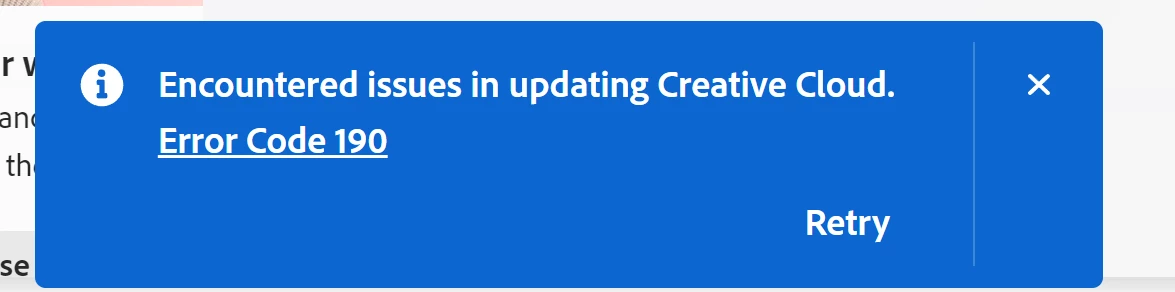
Yesterday, my beta version was updated to 27.10 m 3610, and since then, every time I launch Creative Cloud, I get a message saying I need to update it, and then error 190 occurs.

I've tried it on two different PCs, and the error is the same. I've also uninstalled and reinstalled Creative Cloud, but the error persists.

My system is a fully updated Windows 10, and I'm enrolled in the ESU. Aside from that, all my other subscribed applications launch correctly, including Creative Cloud.
Edición    Windows 10 Pro
Versión    22H2
Instalado el    ‎18/‎10/‎2024
Compilación del sistema operativo    19045.7548
 

...

    48 replies

    Participant
    July 28, 2026

    I am running Windows 10. Extended Security Updates. I've been running the same OS fully updated for years with no problem with CC. The latest Adobe CC update broke it.

    Just checking, do you happen to have Adobe Bridge installed on your system? We've seen a few cases where users with Bridge installed experienced a similar issue.
     
    I do have Bridge installed. Version 14.0.1
     
    It doesn't show up in the CC app. Only versions 16.03 and 16.06 with a note on .06 stating it isn't compatible with my system. .03 doesn't have that message.
     .
    I don't have either of the versions 16 installed.
     

    Inspiring
    July 28, 2026

    I have exactly the same issue. Windows 10 Pro 64-bit. Version 22H2. “Creative Cloud update failed. Sorry, we couldn’t update the app. Error Code 190.” Nothing has changed in my hardware. It's clearly a bug.

    onazole
    onazoleAuthor
    Inspiring
    July 28, 2026

    I've already stated in the thread that it's not a bug; what Creative Cloud detects is that your plan includes Bridge, and Adobe doesn't support Windows 10 version 16.0.6.

    If you search for Bridge in Creative Cloud, you'll see that it says so.

    Inspiring
    July 28, 2026

    I don’t have Bridge installed. It still comes up with that error.

    TongL
    Participant
    July 28, 2026

    Hello,

    I have recently started encountering Error Code 190 whenever Adobe Creative Cloud Desktop attempts to update automatically.

    My system information is as follows:

    • Operating system: Windows 10 Pro 64-bit

    • Version: 22H2

    • OS build: 19045.6466

    • Creative Cloud Desktop language: Chinese

    • Error message: “There was a problem updating Creative Cloud. Error Code: 190.”

    The issue began around mid-to-late July 2026. Before that, Creative Cloud had been working normally on this computer, and I am not aware of any recent hardware changes or system configuration changes that may be related.

    Creative Cloud Desktop itself still opens normally. However, shortly after launch, a notification appears stating that the Creative Cloud update has failed with Error Code 190. Clicking “Retry” results in the same error appearing again.

    My currently installed Adobe applications, including Photoshop, Premiere Pro, Illustrator, and Media Encoder, still appear to launch normally. Photoshop Beta is also installed. The issue therefore seems to affect the Creative Cloud Desktop update itself rather than the installed Adobe applications.

    According to Adobe’s published system requirements for Creative Cloud Desktop, Windows 10 64-bit version 1903 or later is supported. Windows 10 22H2 should therefore meet the stated requirements. For this reason, I am concerned that the latest Creative Cloud update may be incorrectly identifying Windows 10 22H2 as an unsupported operating system.

    I have also found reports from other users who began experiencing the same issue during the same period. These include users with the exact same OS build, 19045.6466, as well as users running newer Windows 10 ESU builds. Some users have reported that reinstalling Creative Cloud did not resolve the issue.

    Could Adobe please confirm the following:

    1. Is this a known issue affecting the latest version of Creative Cloud Desktop on Windows 10 22H2?

    2. Could Photoshop Beta, Adobe Bridge, or another application associated with the account be triggering the system requirements check?

    3. Will Adobe release a corrected Creative Cloud update or compatibility manifest?

    4. Is it safe to temporarily ignore this notification while the installed Adobe applications continue to function normally?

    Thank you.


    onazole
    onazoleAuthor
    Inspiring
    July 28, 2026

    What Adobe needs to do is restore Windows 10 support to Bridge and not remove it from any other app.

    kglad
    Community Expert
    Community Expert
    July 28, 2026

    @onazole 


    hopefully, that will occur with respect to the next bridge version, but long-term win 10 support will disappear.

    HelloWORLD Verlag
    Known Participant
    July 27, 2026

    Same here. Error 190

    System: Windows 10 Pro
    Version: 22H2 (Build 19045.7548)

    I am only using Adobe Acrobat und Adobe Creative Cloud.
     

    The computer easily exceeds all minimum requirements, and everything was working flawlessly until 4 days ago.
     

    I tried installing Creative Cloud on another desktop PC as well as on a laptop—both running the exact same system setup as the original computer—and I'm getting the same Creative Cloud error.

    However, when I try to install Acrobat from within Creative Cloud, it works perfectly.

    I've already contacted Adobe Support, but that's just a complete waste of time. You don't get anything out of them beyond basic, script-based troubleshooting ('painting by numbers').

    Hopefully, their support will soon be replaced by a generic AI...

    onazole
    onazoleAuthor
    Inspiring
    July 27, 2026

    An AI (Gemini) told me that it's because your PCs don't support version 16.0.6 of Bridge, which is probably included in your contracted plan.

    HelloWORLD Verlag
    Known Participant
    July 27, 2026

    Nope. No no Bridge included See screenshots …


    Participating Frequently
    July 26, 2026

    The same: Win10 H2!

    Since 22 July I am disconnected with Adobe Fonts!!!!!!!!!!!!!!!!!!!!!!!!!!!!!!!!!!!!!
    If I good understand, my apps will lost connection some day also?
    No more than 30 days?

    Thank you Adobe! Very pro and commercial behaviour, but we have agreement, sure?!


    The CC Desktop app does not see any updates, any apps, if I install app, it is signed as installed, but in a while installation status changed to not installed.


    I told with Adobe Help, but they said like mantra, problem is in my system, but it is not!
    I used all solution given round, no solution. All used to stop during downloading and connecting to Adobe servers with this broken new update. Sometimes is going until 43%, sometimes to 72% of process.

    Were is Adobe here on forum now?!
    Are you crazy?! All packet is hanging on this tiny CC Desktop app?
    I think about you since years not too much as experts and profis, but this… this is pick of picks of stupidity! And BTW. when I chatted with your engineers, I have so big imagination, you do not know, that this small update killed everything!
    You do not connect dots that all stopped now and you agreed to service constant services for money! This is not a big legal problem for you in EU maybe, but in US… Run, Forest, run!


    Participant
    July 25, 2026

    I have the same problem (Win 10 Pro, 22H2). I contacted Adobe support via chat. The support agent remotely uninstalled CC and installed the latest version (6.10.0.252.3). It installed without a problem, but I keep getting error 190. Now I have the latest version (6.10.0.252.3) on one device and version 6.9.1.1.3 on the other. But the error returns on both. So I think it's something on Adobe's end.

    Check your CC version – you might have the latest one.

    onazole
    onazoleAuthor
    Inspiring
    July 25, 2026

    This error occurs because you have Bridge included in your Adobe plan. You can verify that Windows 10 is no longer listed in Bridge's specifications, and you can't even download it.

    Participant
    July 25, 2026

    But I have an older version of Bridge that was compatible with Windows 10. Are these older versions no longer compatible?

    Besides, Adobe could somehow inform about such conflicts or resolve them.

    Jeff_A_Wright
    Community Manager
    Community Manager
    July 24, 2026

    @onazole, I am sorry you continue to be unable to install Adobe Bridge.


    My apologies, but I am going to ask you to repeat many of the previous instructions that were provided at

    , but I can understand if you do not want to wait for a possibly unrelated issue from a different poster to be resolved. You would prefer to resume your work in Adobe Bridge on Windows 10.


    Please go to Start > Run, type Winver, and update this discussion with the Windows 10 build you are installing.


    In addition, please check the PDA app and the Adobe Bridge install log for any FATAL errors. The logs are appended to each time, so the most recent errors will be at the end of the log. Please do not paste the entire log, but only the text surrounding the most recent FATAL error. For information on how to locate your most recent occurrence of Error 190, see https://helpx.adobe.com/creative-cloud/kb/troubleshoot-install-logs-cc.html.


    I look forward to your update, ​@onazole.

    onazole
    onazoleAuthor
    Inspiring
    July 24, 2026

    I don't want to install Bridge; what I mean is that the Creative Cloud error is because Windows 10 support for Adobe Bridge has been discontinued. Creative Cloud itself is fine.

    I really don't know how else to explain it.

    Jeff_A_Wright
    Community Manager
    Community Manager
    July 24, 2026

    I think I understand the confusion, ​@onazole. Bridge is a separate installation from the Creative Cloud Desktop app, but if you start the Bridge installation from one of our web pages, or if the Creative Cloud Desktop app has a mandatory update to apply, it could appear to be related.


    If you do want me to review your current occurrence of Error 190 and how it is impacting your computer, @onazole, please update this public discussion with the FATAL errors you discover.

    Jeff_A_Wright
    Community Manager
    Community Manager
    July 23, 2026

    @onazole and others, thank you for your detailed post. Please see 

     where this same error is being discussed. I have requested information from the original poster regarding the contents of the log file. I recommend subscribing to this active discussion about the recent Error 190 on Windows 10 2H22.

    Sekorts
    Participant
    July 23, 2026

    Same here, I did have a windows update stuck for a while, but just did and I'm on the latest version and receiving the same error 


    CShubert
    Community Manager
    Community Manager
    July 23, 2026

    Hi all, a couple things to check if you are seeing this error:

    Error 190 generally indicates that the app does not meet the system requirements for installation or update. You can find Adobe’s troubleshooting article here:

    Please also review the current Photoshop desktop system requirements here:

    To help confirm whether this is a requirements-related issue on your machine, please check your Windows version:

    1. Press Win + R
    2. Type winver
    3. Press Enter
    4. Note the Windows version and OS build shown in the dialog

    If your system does not meet the current requirements listed on the Photoshop technical requirements page, updating Windows may resolve the issue.

    If your system already meets the listed requirements and you still see Error 190, please reply with:

    • Your exact Windows version and OS build
    • Your exact Photoshop Beta version/build
    • Whether the same issue occurs on more than one machine

    That will help us investigate further.

    Thanks,

    Cory - Photoshop Product Manager

    onazole
    onazoleAuthor
    Inspiring
    July 23, 2026

    All that information is already included in the bug report I made, of course including the Windows version and the beta version.

    Please check them.

    Participant
    July 23, 2026

    Thanks for answering. I’ve already checked the above and I confirm that my device meets the minimum requirements for both. I’m having this issue with Creative Cloud Desktop App. Haven’t encountered an issue with Photoshop so far.

    My computer runs Windows 10 Home 22H2, OS Build 19045.6466
    I use only one computer.