Participant
December 30, 2019
Question

Error 198 when Updating Adobe Creative Cloud on Imac High Sierra

  • December 30, 2019
  • 1 reply
  • 9430 views

Hi, 


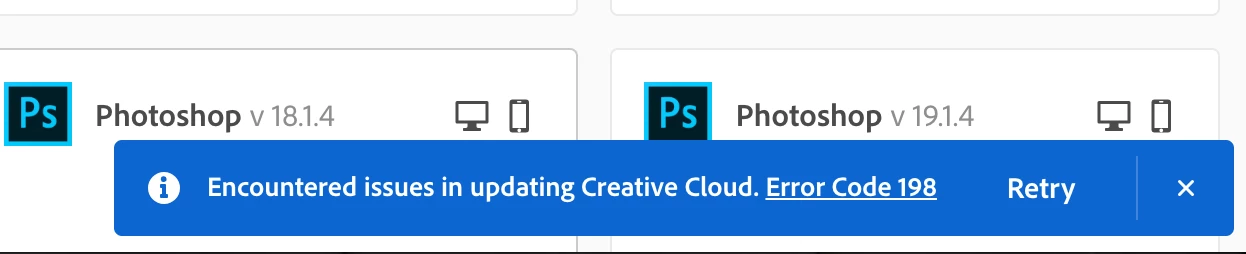
I'm having trouble updating Adobe Creative Cloud, the error (Code 198) appears halfway through the installation of the update. Any advice on how to solve this issue.


Thanks. 
 

This topic has been closed for replies.

1 reply

DelphiZoa
Participating Frequently
December 30, 2019

Hi Noah-9,


Is it the Creative Cloud app itself you're having issues updating? Have you tried the solutions in this help document?


Let us know if any of those fix the problem or if you need additional troubleshooting.

Noah-9Author
Participant
December 30, 2019

Hi DelphiZoa, 


Correct, I'm trying to update the creative cloud app, I added a screenshot below for what I see when I try to update. 


Thanks for providing the link, but I would hate to reinstall all the apps. Everything now works great it's just that the creative cloud app is not updating. 

DelphiZoa
Participating Frequently
December 31, 2019

Hi Noah-9,


I understand the reluctance to uninstall and reinstall. You can certainly try some other basic troubleshooting first to see if it helps. Some suggestions:

  • ensure your computer meets the system requirements for the latest version of Creative Cloud (minimum Windows 10 64 bit or Mac OSX 10.12)
  • sign out and back into Creative Cloud and try the update again
  • restart your computer and try the update again
  • disable firewall or antivirus protection temporarily while updating
  • try installing under a new admin account. Here are instructions for Windows and Mac.


Aside from those steps, the thing that seems to help most people with Error Code 198 is to run the Creative Cloud Cleaner Tool, which is referenced in the help document I linked in my last reply. The cleaner tool removes remnants that may be interfering with an update. Of course, the Cleaner Tool involves uninstalling and reinstalling as well.


Maybe someone else has another workaround?