Taaamiiii
Participant
November 9, 2022
Question

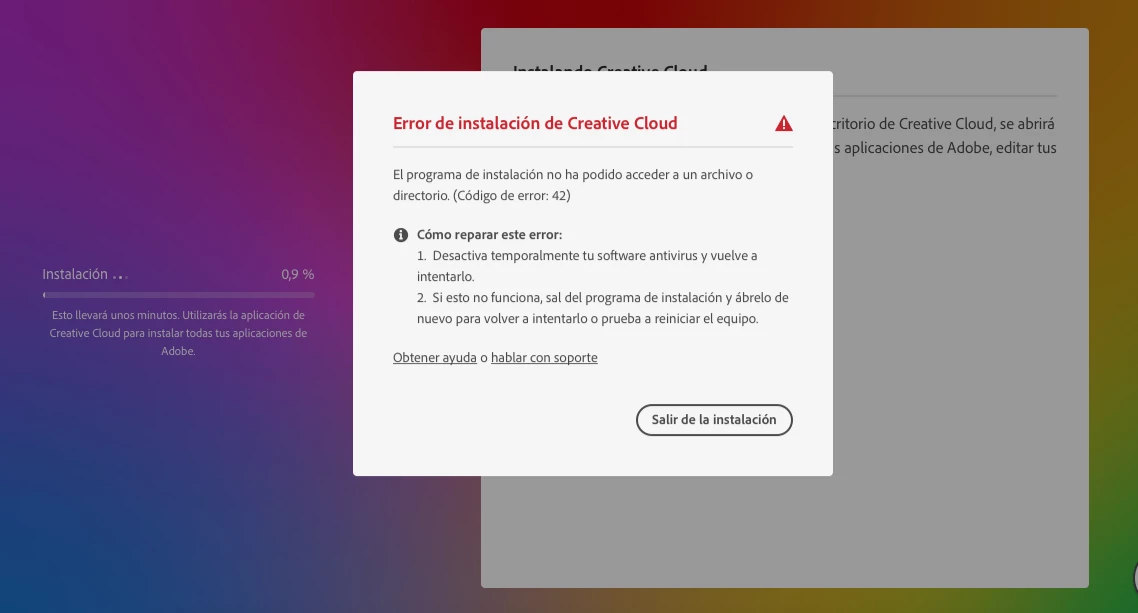
Error 42

  • November 9, 2022
  • 2 replies
  • 2224 views

Hola!

tengo este error (error 42), he probado todas las soluciones mensionadas y nada. Cargue las llaves nuevas, desintale todo y volvi a instalar, probe veriones antiguas y nada. Sigo con el mismo error.

Necesito conurgencia solucionarlo, ya que debo entregar un proyecto urgente.

Caracteristicas de mi MAC

Macbook Pro 2012 con Catalina version 10.15.7


Ayudaaaa!!

This topic has been closed for replies.

2 replies

sim  so dep
Participant
November 9, 2022

rror 42 occurs because the installer was denied access to a necessary file or folder. This error commonly occurs when Windows cannot validate the digital certificates included with the installation files.


You can find information on how to fix problems updating digital certificates at https://helpx.adobe.com/creative-cloud/kb/Error-code-42-or-72-when-installing-or-updating-Creative-C....


If you have an individual Creative Cloud membership and continue to encounter Error 42, then please download the Creative Cloud desktop app using the Alternative downloads method from https://helpx.adobe.com/download-install/kb/creative-cloud-desktop-app-download.html. Once the installation files arrive, you can execute the installer, and the updated certificates will be added to the computer as part of the installation process.


If you have a Creative Cloud for Team or Enterprise membership, or an organization manages the computer, please get in touch with the simple organization's Creative Cloud plan administrator for assistance. They can remove any restrictions preventing the certificate validation process from completing successfully.

kglad
Community Expert
Community Expert
November 9, 2022

reset the cc desktop app: make sure it's in the foreground, then press:

Win: Ctrl + Alt + R
Mac: Cmd + Opt + R

if that fails, try to repair
https://helpx.adobe.com/download-install/kb/creative-cloud-install-stuck.html

if that fails go ahead and uninstall using the correct uninstaller from https://helpx.adobe.com/creative-cloud/help/uninstall-creative-cloud-desktop-app.html#sa_src=web-messaging and then reinstall

if that fails, do a clean cc install following each applicable step:

uninstall every cc app including preferences, https://helpx.adobe.com/creative-cloud/help/uninstall-remove-app.html

then uninstall the cc desktop app, again using the correct uninstaller, https://helpx.adobe.com/creative-cloud/help/uninstall-creative-cloud-desktop-app.html#sa_src=web-messaging

clean your computer of cc files per http://www.adobe.com/support/contact/cscleanertool.html

check for, and if available, update your os

repair all ms visual c++ versions that can be repaired.

update your ms visual c++, if it can be updated

restart your computer (don't skip this)

reinstall the cc desktop app, https://creativecloud.adobe.com/apps/all/desktop?action=install&source=apps&productId=creative-cloud

if you're unable to download the cc desktop app at this stage, use the "alternative download links" at the bottom of the page at https://helpx.adobe.com/download-install/kb/creative-cloud-desktop-app-download.html

use the desktop app to install your cc programs/trials