


Inspiring
March 19, 2022
Answered

Error Code 127 / Illustrator

  • March 19, 2022
  • 4 replies
  • 15882 views

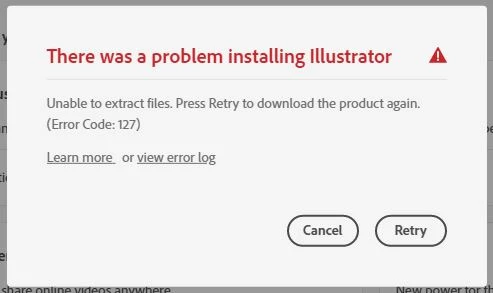
Ever since a recent update all of my programs started acting funky. Over all I've gotten everything back to normal except for illustrator. No matter what I do to attempt to fix the issue, ACC refuses to download illustrator.

- This happens regardless of which version I choose
- I've tried using the control panel to repair the ACC program
- I've done a full uninstall/reinstall of ACC and everything else
- I've tried AdobeCreativeCloudCleanerTool in a different uninstall/reinstall attempt
- I've tried manually deleting all adobe related files (after uninstalling all programs) to see if anything lingering was causing the issue 
- I've tried lowering fire wall settings just to see if itll let illustrator through
- I've tried allowing more control in permisions for the C:\adobeTemp folder

Other than the litany of different and sketchy looking solutions people have posted about over the years, I have 0 additional ideas on how to solve this issue and I haven't been able to find any difinitive fixes from Adobe's side. 
Correct answer KevinLaytonMcAllister

Am i seriously going to have to wait 3 days everytime your tech tries, fails and reports back to a senior tech every time something is attempted? Why is this such a long process?


Today the Senior Tech finally got directly involved and resolved things.

Trial and Error aside, best guess is there was corrupted files hiding in either the "C:\adobeTemp" folder or the "%appdata%" location.

For any unlucky soul who comes across this thread, best advice is to secure your work and then purge everything program related from all of your drives (uninstalling and manually deleting Adobe related folders) and utilize the "AdobeCreativeCloudCleanerTool.exe" tool incase anything was missed.

During my initial purge I did overlook "%appdata%" so that was most likely my issue.

4 replies

Participant
April 23, 2025

please help adobe illustrator installtion problme solve the error 127

Shivangi_Gupta
Community Manager
Community Manager
April 23, 2025

Hi @muneeba_7281,

We appreciate you reaching out. Error 127 usually appears when the installation files are not extracted properly. Have you tried the steps listed in this article?https://adobe.ly/4cGz4iI

Let us know if it helps.
^Shivangi

Inspiring
March 22, 2022

Ok its tuesday now, is anyone able to actually help? 
Customer care wasn't able to help me and I'm not letting this issue go.

Monika Gause
Community Expert
Community Expert
March 22, 2022

What do you mean they weren't able to help you? Please tell us some details of what they found out.

Inspiring
March 22, 2022

They initiated a remote connect and ran through their procedures, everything came right back to error 127.
The responder claimed they would get back with me but its been 2 days now. 

Inspiring
March 20, 2022

Is anyone from adobe actually going to help or am i just sol?
With the money we put into these programs I would very much like a solution to this issue

Monika Gause
Community Expert
Community Expert
March 20, 2022

It's the weekend.


Please contact Customer Care: https://helpx.adobe.com/contact.html
The chat window is in the bottom right. You have to be logged into your account to use this page.

Mylenium
Legend
March 19, 2022

Without any actual system info and ideally the excerpts from the install logs we can't really tell you much. To me this sounds more like the actual installer cache is locked/ tainted and it refuses to overwrite the files in there, which may require deeper surgery at the system level. At the very least try to uninstall the programs using your system's means, not the CC app, ideally under escalated user privileges/ in safe mode. That way you may be able to get rid of the blockage. You may just need to run this multiple times, as suddenly components previously registered under a single installer may appear as multiple installs/ uninstalls.


Mylenium

Inspiring
March 19, 2022

Where could I manually pull up the error log, ACC isn't pulling it up when i click "view error log"

And when you say to uninstall using "my system's means" are you refering to the control panel?