


Participant
September 14, 2021
Answered

Error Code 207 when installing Adobe Creative Cloud on Windows 10 Computer

  • September 14, 2021
  • 1 reply
  • 2682 views

I am having trouble downloading the Creative Cloud App to my Windows 10 computer. When attempting a download, the installer gets stuck at a very low percent, after which it gives me the error code 207. 


I have tried all of the recommendations on this page: https://helpx.adobe.com/download-install/kb/creative-cloud-install-stuck-advanced.html including but not limited to: temporarily turning off my firewall and virus protection software and running additional downloadable programs by Adobe designed to clear out corrupted files. None of those options have worked. I am still running into the same error.

This topic has been closed for replies.
Correct answer kglad

adobe recently upped their requirements for browser security, https://helpx.adobe.com/x-productkb/multi/eol-tls-support.html so if you have a non-current os, https://helpx.adobe.com/x-productkb/multi/eol-tls-support.html#sa_src=web-messaging000


otherwise, confirm that you can connect to the secure adobe servers by reading, http://helpx.adobe.com/x-productkb/policy-pricing/activation-network-issues.html do you see both logos?


if you can and still see a connection error try these steps, https://helpx.adobe.com/download-install/kb/common-network-connectivity-issues.html


if those all fail, white list the adobe network endpoints, https://helpx.adobe.com/enterprise/kb/network-endpoints.html or contact support*


*using a browser that allows popups and cookies, contact adobe support during pst business hours by clicking here, https://helpx.adobe.com/contact.html

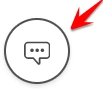
click contact us (= cryptic icon in the lower right)

in the chat field, type AGENT
be patient, it can take quite a while to reach a human


1 reply

kglad
Community Expert
kgladCommunity ExpertCorrect answer
Community Expert
September 29, 2021

adobe recently upped their requirements for browser security, https://helpx.adobe.com/x-productkb/multi/eol-tls-support.html so if you have a non-current os, https://helpx.adobe.com/x-productkb/multi/eol-tls-support.html#sa_src=web-messaging000


otherwise, confirm that you can connect to the secure adobe servers by reading, http://helpx.adobe.com/x-productkb/policy-pricing/activation-network-issues.html do you see both logos?


if you can and still see a connection error try these steps, https://helpx.adobe.com/download-install/kb/common-network-connectivity-issues.html


if those all fail, white list the adobe network endpoints, https://helpx.adobe.com/enterprise/kb/network-endpoints.html or contact support*


*using a browser that allows popups and cookies, contact adobe support during pst business hours by clicking here, https://helpx.adobe.com/contact.html

click contact us (= cryptic icon in the lower right)

in the chat field, type AGENT
be patient, it can take quite a while to reach a human