


theclarksonschool
Participant
February 22, 2017
Answered

Error Code: P206

  • February 22, 2017
  • 3 replies
  • 19666 views

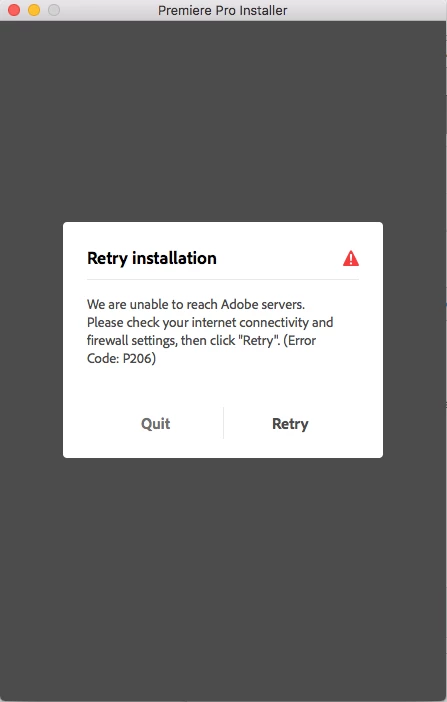
I am attempting to download adobe premiere pro. I get this error screen which says:

"We are unable to reach Adobe servers. Please check your internet connectivity and firewall settings, then click "Retry". (Error Code: P206)"

I have internet connection and the firewall is turned off. I have a MacBook Pro (retina 13in) running on macOS Sierra 10.12.3

Does anyone know how to overcome this error?
This topic has been closed for replies.
Correct answer kglad

not the second one. but they said that was ok.


using a browser that allows popups and cookies,  contact adobe support during pst business hours by clicking here and, when available, click 'still need help', http://helpx.adobe.com/x-productkb/global/service-ccm.html

3 replies

Billynair
Participant
March 31, 2022

None of these worked for me, I'm on windows 7, and not sure if that is the issue, but, I did find the Microsoft "Easy Fix" for their "TLS 1.2 update" worked.


(not sure if I can post links)

https://support.microsoft.com/en-us/topic/update-to-enable-tls-1-1-and-tls-1-2-as-default-secure-protocols-in-winhttp-in-windows-c4bd73d2-31d7-761e-0178-11268bb10392

Participant
April 9, 2022

As a fellow 7 user (I thought I was the only one left), I too had the same problem, and your suggested fix solved it in seconds.

Many thanks to you!!!!

kglad
Community Expert
Community Expert
April 9, 2022

for others looking for an updated (from 2017) response, adobe increased their requirements for browser security, https://helpx.adobe.com/x-productkb/multi/eol-tls-support.html

vid_uo
Participant
September 26, 2017

I had this same problem with Acrobat DC.

I was, however; able to install the Creative Cloud Installer app.

Once I did that I was able to install the other CC apps from that interface.

kglad
Community Expert
Community Expert
February 22, 2017

confirm that you can connect to the secure adobe servers.

for help with that and other common secure adobe.com connection problems read, http://helpx.adobe.com/x-productkb/policy-pricing/activation-network-issues.html

theclarksonschool
Participant
February 22, 2017

I did everything on that website and it did not solve the problem

kglad
Community Expert
Community Expert
February 22, 2017

were you able to connect to the secure adobe servers?
