Participant
January 26, 2015
Answered

Error when starting After Effects CC / Trying to install AMM

  • January 26, 2015
  • 1 reply
  • 139 views

I keep getting an error saying that my Application Manager is missing or damaged whenever I run AE. This is more of an AMM problem than an AE one I think, because I have had this problem before but I was always able to fix it when I reinstalled the Application Manager. So, I downloaded it again and re-installed it (AFTER using the ACC Cleaner Tool) but this time this keeps popping up:
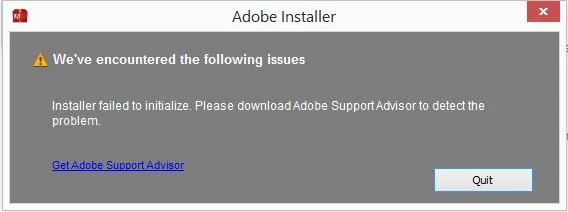
Not sure what to do. None of the my other adobe products work either because I am missing the AMM. Is there another way to make AE work? I need it by tomorrow.

Does this have anything to do with signing up for Creative Cloud because that won't run properly either?

Sorry, n00b here.

--

Windows 64

After Effects CC

    This topic has been closed for replies.
    Correct answer zblanco

    It finally started working again this morning. I have no idea why.

    -----

    I am using After Effects CC.

    Windows 8, 64 bit.

    I uninstalled it and used ACC Cleaner Tool to remove Adobe Application Manager.

    1 reply

    Jeffrey_A_Wright
    Legend
    January 26, 2015

    Zblanco I am sorry but what version After Effects are you trying to use CC or CS6?  You discuss After Effects CC through the discussion then you state you just signed up for the Creative Cloud but that doesn't work either.  Can you please provide additional details.  If you can include what operating system you are using and what Adobe Creative applications do you currently have installed?

    Finally you mentioned you remove the Adobe Application Manager and reinstalled.  How exactly did you accomplish this?

    zblancoAuthorCorrect answer
    Participant
    January 28, 2015

    It finally started working again this morning. I have no idea why.

    -----

    I am using After Effects CC.

    Windows 8, 64 bit.

    I uninstalled it and used ACC Cleaner Tool to remove Adobe Application Manager.