Participant
December 27, 2013
Answered

Error when starting InDesign CC after first installation.

  • December 27, 2013
  • 1 reply
  • 1926 views

I'm running CC under OS X 10.9. Having installed InDesign CC as an admin-user using the CC Manager InDesign won't start. Repairing the disk permissions won't help. Uninstalling an reinstalling InDesign CC won't help. Thank you for any help!
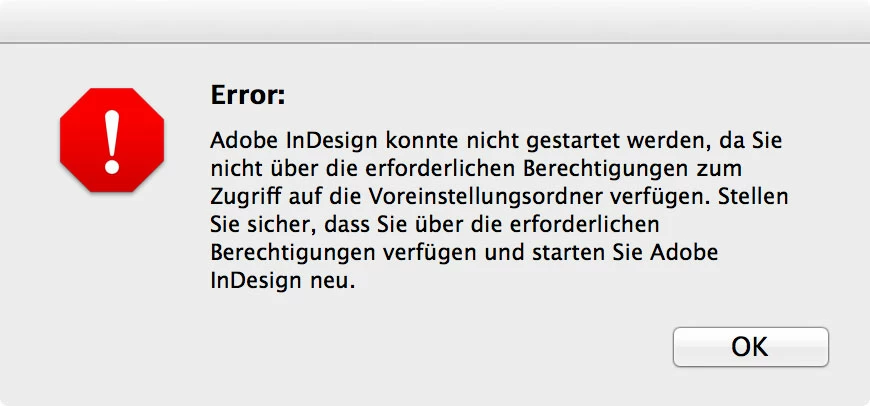
This topic has been closed for replies.
Correct answer Jeffrey_A_Wright

Christian Wendling can you please translate the error you are receiving to English?  This is a an English language forum and the built-in translation engine does not translate images.

I would also recommend reviewing your installation logs for InDesign CC for errors.  Please see Troubleshoot install issues with log files | CC - http://helpx.adobe.com/creative-cloud/kb/troubleshoot-install-logs-cc.html for information on how to locate and interpret your installation log files.  Please feel free to post any specific errors you discover to this discussion.

1 reply

Jeffrey_A_Wright
Jeffrey_A_WrightCorrect answer
Legend
December 27, 2013

Christian Wendling can you please translate the error you are receiving to English?  This is a an English language forum and the built-in translation engine does not translate images.

I would also recommend reviewing your installation logs for InDesign CC for errors.  Please see Troubleshoot install issues with log files | CC - http://helpx.adobe.com/creative-cloud/kb/troubleshoot-install-logs-cc.html for information on how to locate and interpret your installation log files.  Please feel free to post any specific errors you discover to this discussion.

Participant
December 28, 2013

@Jeff A Wright, thank you for responding!

#1. Translation of the received error: "Adobe InDesign could not be started because you do not have the required permissions to access the preferences folder. Make sure that you have the necessary permissions and restart Adobe InDesign."

#2. The IndDesign log file reports some errors:

12/28/13 10:12:01:074 | [ERROR] |  | OOBE | DE |  |  |  | 114051 | DF037: Unable to delete directory "/Library/Application Support/Adobe/InDesign/Version 9.0". Check and correct folder & parent directory permissions and then try again.(Seq 265)

12/28/13 10:12:37:556 | [ERROR] |  | OOBE | DE |  |  |  | 118499 | DF037: Unable to delete directory "/Users/cwendling/Library/Application Support/Adobe/CEPServiceManager4". Check and correct folder & parent directory permissions and then try again.(Seq 1)

12/28/13 10:12:37:562 | [ERROR] |  | OOBE | DE |  |  |  | 118499 | DF037: Unable to delete directory "/Library/Application Support/Adobe/CameraRaw/LensProfiles/1.0/Nikon". Check and correct folder & parent directory permissions and then try again.(Seq 3)

12/28/13 10:12:37:565 | [ERROR] |  | OOBE | DE |  |  |  | 118499 | DF037: Unable to delete directory "/Library/Application Support/Adobe/CameraRaw/LensProfiles/1.0". Check and correct folder & parent directory permissions and then try again.(Seq 4)

12/28/13 10:12:37:566 | [ERROR] |  | OOBE | DE |  |  |  | 118499 | DF037: Unable to delete directory "/Library/Application Support/Adobe/CameraRaw/LensProfiles". Check and correct folder & parent directory permissions and then try again.(Seq 5)

12/28/13 10:12:37:571 | [ERROR] |  | OOBE | DE |  |  |  | 118499 | DF037: Unable to delete directory "/Library/Application Support/Adobe/CameraRaw/CameraProfiles/Camera". Check and correct folder & parent directory permissions and then try again.(Seq 6)

12/28/13 10:12:37:578 | [ERROR] |  | OOBE | DE |  |  |  | 118499 | DF037: Unable to delete directory "/Library/Application Support/Adobe/CameraRaw/CameraProfiles/Adobe Standard". Check and correct folder & parent directory permissions and then try again.(Seq 7)

12/28/13 10:12:37:579 | [ERROR] |  | OOBE | DE |  |  |  | 118499 | DF037: Unable to delete directory "/Library/Application Support/Adobe/CameraRaw/CameraProfiles". Check and correct folder & parent directory permissions and then try again.(Seq 8)

12/28/13 10:12:37:581 | [ERROR] |  | OOBE | DE |  |  |  | 118499 | DF037: Unable to delete directory "/Library/Application Support/Adobe/CameraRaw". Check and correct folder & parent directory permissions and then try again.(Seq 9)

12/28/13 10:12:37:583 | [ERROR] |  | OOBE | DE |  |  |  | 118499 | DF037: Unable to delete directory "/Library/Application Support/Adobe/Adobe PDF/Settings". Check and correct folder & parent directory permissions and then try again.(Seq 10)

12/28/13 10:12:37:585 | [ERROR] |  | OOBE | DE |  |  |  | 118499 | DF037: Unable to delete directory "/Library/Application Support/Adobe/Adobe PDF/Extras". Check and correct folder & parent directory permissions and then try again.(Seq 11)

12/28/13 10:12:37:586 | [ERROR] |  | OOBE | DE |  |  |  | 118499 | DF037: Unable to delete directory "/Library/Application Support/Adobe/Adobe PDF". Check and correct folder & parent directory permissions and then try again.(Seq 12)

12/28/13 10:12:42:827 | [INFO] |  | OOBE | DE |  |  |  | 112146 | Exit Code: 0 - No error.

I checked and corrected all permissions for these directories (read + write for system + admin / I have admin status), also for /Applications, but the error remains...

Jeffrey_A_Wright
Legend
December 28, 2013

Christian please try deleting the log file and then try the installation again.  If you are still seeing the same error message then please try installing under a newly created Administrator account.  You can find details on how to create a new administrator account at Install or run Adobe applications in new user account | Mac OS X - http://helpx.adobe.com/x-productkb/global/install-or-run-applications-new.html.