
Participating Frequently
April 10, 2016
Answered

Exit Code: 126 Validation error and Exit Code: 123 trying to install XD

  • April 10, 2016
  • 2 replies
  • 7018 views

Hi guys,

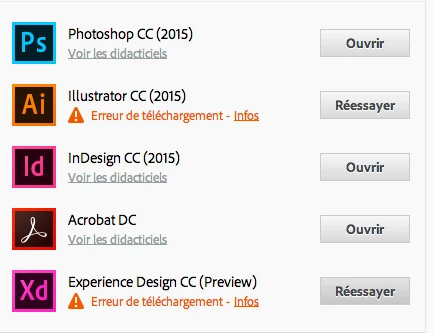
I try to install illustrator CC and Experience Design CC for 3 days now and i always have the "download error" warning.

Any clue how to fix this ?

I'm using a mac with Yosemite 10.10.5

Thx !

Logs below :

Exit Code: 126

-------------------------------------- Summary --------------------------------------

- 2 fatal error(s), 0 error(s), 2 warnings(s)

FATAL: Fatal Error '126' occurred while download

FATAL: Error occurred in download of package (Name: coreAssets Version: 0.5.0). Error code: '126'

WARN: Invalid arguments to utilDecodeBase64Data.

WARN: Invalid arguments to utilDecodeBase64Data.

-------------------------------------------------------------------------------------
Exit Code: 126

-------------------------------------- Summary --------------------------------------

- 2 fatal error(s), 0 error(s), 2 warnings(s)

FATAL: Fatal Error '126' occurred while download

FATAL: Error occurred in download of package (Name: AdobeIllustrator19-Core Version: 19.2.1.147). Error code: '126'

WARN: Invalid arguments to utilDecodeBase64Data.

WARN: Invalid arguments to utilDecodeBase64Data.

-------------------------------------------------------------------------------------

This topic has been closed for replies.
Correct answer Karen Beal

Wave Team the fact that you aren't able to install the Creative Cloud desktop app without using a direct download link would seem to indicate an unresolved download configuration error.  You can find guidance on how to resolve download configuration errors in post in message #22 of this discussion.  I would recommend starting a new discussion with any specific errors you discover.

I would encourage everyone who is already working with our support team directly to please continue to do so. For those experiencing this difficulty who have not contacted our support team you can do so at Contact Customer Care.

If you can please update the discussion with the case number, from your contact with our support team, it would be appreciated.

If you do discover any new errors within the DLM.log then please post those to this discussion.  It may give more insight on what type of download errors are occurring.


Hi Fred and Jeff

I have managed to reinstall Yosemite with the help of our tech consultant and XD is now downloaded and working. Yippee! He said the only issue he encountered when reinstalling was a corruption with Flash. The version I had was up to date but it kept crashing the system – so he replaced that and it is now working fine. Thought that might offer some help.

Thank you for all your help!

Karen

2 replies

Govardhan.V
Participating Frequently
April 10, 2016

If you still get same error , for confirmation purpose , try downloading from direct link and see whether you are able to download :

http://prodesigntools.com/adobe-cc-2015-direct-download-links.html

Govardhan.V
Participating Frequently
April 10, 2016

Make sure there are no Adobe entries in Hosts like 127.0.0.1 activate.adobe.com...................etc

If Mac Firewall is turned ON , turn it OFF.

If you are using wireless or Wifi Internet , if possible try with Wired Ethernet connection .

Uncheck Use FTP passive mode option under Proxies tab.

Then try to install again .

Please refer below link :

Error downloading, installing, or updating Adobe Creative Cloud apps

Participating Frequently
April 10, 2016

Thank you for your answer.

Mac Firewall was aIready off.

I'm using a wired ethernet connection

I've just tried to uncheck "Use Passive FTP Mode" and it didn't change a thing.

It's weird because right now i'm downloading Fuse CC just fine through the Creative Cloud app.

It just doesn't work with illustrator and Experience Design (may be some others too but i didn't try to download all apps so far)

I'm using the direct link page (thanks !) to get illustrator but Experience Design is not available there.

May be there is somewhere some temp files stucked for those two ?

Atul_Saini
Legend
April 15, 2016

Hi Fred%20Kempf‌,

Here are a couple of things that I would request you to try.

1. Close the following processes


  • CreativeCloud
  • Adobe CEF Helper`
  • Adobe Desktop Service
  • AdobeIPCBroker
  • Creative Cloud
  • Adobe Installer
  • AdobeUpdateDaemon
  • AdobeServiceInstaller
  • AAM Update Notifier
  • CCLibrary
  • node
  • Core Sync

2. Clear /tmp folder > Launch Creative Cloud app and install Experience Design

Hope this helps.