
Inspiring
February 1, 2017
Answered

Experience Design CC fails to complete update, Windows 10

  • February 1, 2017
  • 6 replies
  • 2017 views

I'm having a problem updating Experience Design CC (Beta) through the CC desktop app (v 3.9.1.335). I'm using Windows 10 Home, which is up to date.

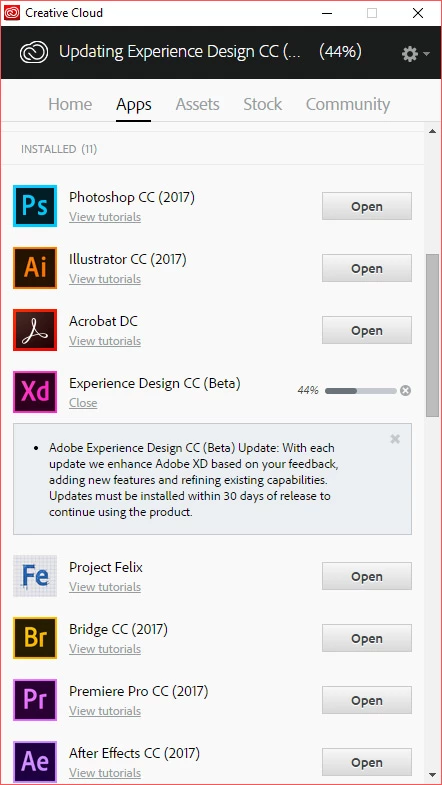
Yesterday I could see that a new update was available for XD so I tried to update it. The progress bar reaches 44% and then stops. I waited for quite a while before clicking cancel. This seemed to do nothing, again, I waited for a while, with no change. So I restarted my PC and tried again. Same thing, it goes as far as 44% and then stops.

At one point yesterday, when I tried several times to update, a message did appear saying something like "An update is already running". There wasn't, it just thinks there is

Normally, updates have always worked fine so I know somethings wrong. Anyway, this is frustrating, can anyone help please?

I attach a screenshot of the CC desktop app, showing the "stuck" update - this happens no matter how many times I try to update 😕😕
Thanks

This topic has been closed for replies.
Correct answer theop80622007

No idea why, after restarting my PC again, the update was sucessful...

6 replies

Inspiring
March 27, 2017

Getting quite tired of this now - once again, the latest update fails to install. So, I also tried other suggestions on this thread to no avail. I'll keep trying, but no one should have to go through any hoops by deleting all manner of cache files and/or folders to update software, it's quite ridiculous Adobe - please sort it

P.S. and whilst I'm venting, it's worse when you factor in the message associated with the update, something like "You must update within 30 days to continue using this product". It's bad enough the update fails (everytime, at 44%) but then you have the pressure of getting it done in 30 days! Ugh I despair...

Inspiring
March 27, 2017

UPDATE: the update successfully installed!

Notes about my PC: Win 10 Home edition, using AVG Antivirus Free.

Steps I took:

1. Restart PC.

2. Once in Windows, quit the Creative Cloud app - right click on the app icon in the notification area and choose Quit.

3. Disable AVG real-time protection, or whichever antivirus software you use.

4. Click on "Start" (the Windows icon) and start typing Creative Cloud. Once it shows in the results, RIGHT CLICK on it and choose "Run as administrator". Click yes to any notices that pop up.

5. Open the app and update.

I hope this helps anyone else with this problem...

Inspiring
February 11, 2017

I have had this problem for a couple of weeks now.. Will not go beyond 44%.. !! Any ideas why. I can't use the program currently.. So the Beta is useless!

henningmosand
Participant
February 11, 2017

Hi,

I experienced the same thing on my machine. After following the instructions on Getting the following message when trying to install Illustrator 2015: Exit Code 184 it worked perfectly.

EDIT: I also removed all the Creative Cloud / Adobe folders I could find under C:\Users\user\AppData\Local\Temp

Let me know if it helps you

Participant
February 2, 2017

Have this issue too on W10 Pro too.

Multiple restarts, uninstalling the CC Desktop App, running the CC Cleaner Tool, uninstalling XD and reinstalling all to no avail.

I'm in the middle of a project and now cannot use XD as I just get a blank screen when it tries to launch.

Inspiring
February 2, 2017

I had these types of issues earlier on in the CC app's release but not so much nowadays - which is why I was surprised to see an update fail when so many have been working fine for ages.

Anyways, I'm guessing you have some anti-virus software installed so try disabling that and try the update again (if you've already tried to update in your current session, reboot first, then disable AV software so you have a "clean" base).

At the same time, close the CC app - restart by selecting Run as Administrator.

Hopefully the combination of the two will help you

Sheena Kaul
Legend
February 1, 2017
Inspiring
February 1, 2017

More info:

FWIW, I specifically ran CC app as Administrator just to be sure it wasn't a permissions issue...

Tried to update again, go to 44%, then I received the following error message this time:

I clicked on More information and then this is shown:

Exit Code: 184

-------------------------------------- Summary --------------------------------------

- 2 fatal error(s), 0 error(s), 1 warnings(s)

FATAL: Error (Code = 184) executing in command 'MoveFileCommand' for package: 'UWPAssets', version:0.6.12.17

FATAL: Error occurred in install of package (Name: UWPAssets Version: 0.6.12.17). Error code: '184'

WARN: Unable to move file at "C:\adobeTemp\ETR7101.tmp\1\SupportAssets\CSDKConfigurator.exe" to "C:\Program Files\Common Files\Adobe\Adobe XD\CSDKConfigurator.exe" Error 32 The process cannot access the file because it is being used by another process.. Try setting correct permissions to the specified file/folder or parent folder, so that admin has rights to modify it.

-------------------------------------------------------------------------------------

theop80622007AuthorCorrect answer
Inspiring
February 1, 2017

No idea why, after restarting my PC again, the update was sucessful...

Inspiring
February 1, 2017

Anyone from Adobe care to help?