

Roy Bisschops
Inspiring
August 27, 2018
Answered

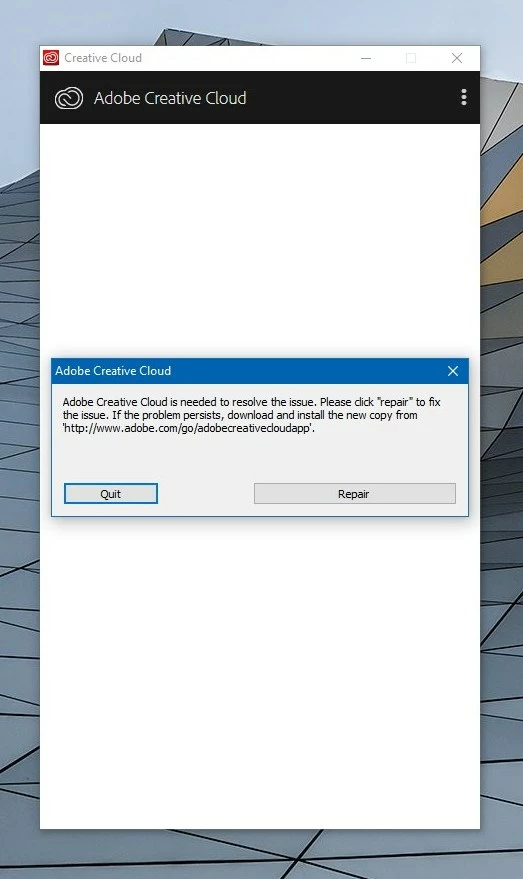
Getting a continuous error message while installing ACC: "creative cloud is needed to resolve this issue" Repair doesn't work. Any ideas?

  • August 27, 2018
  • 5 replies
  • 910 views

Hi, I am experiencing this continuous error while installing the Adobe Creative Cloud-app. I followed all suggestions on the Adobe Forum and have had someone from Adobe support trying to fix the problem, without succes.

In the meantime I have deleted everything from Adobe from my computer, in order to do a fresh install of the ACC-app, Bridge and Photoshop. But I'm still facing this error and now I don't have access to Photoshop and Bridge...

When installing Photoshop or Bridge separately using the direct download links from Adobe, I get "error 1" 😞

Anyone knows a workaround? Thanks.

For completion, these are the steps I have tried, without success.

https://helpx.adobe.com/creative-cloud/kb/creative-cloud-missing-damaged.html
This topic is closed to new replies. Start a new post to keep the conversation going.
Correct answer Roy Bisschops

To everyone who is facing this same issue: today I found my solution, which I have not read on any Adobe help or support page: I killed my running antivirus software in task manager (in my case the software is from Panda Security), and now I was able to install the ACC-app, Bridge and Photoshop without any problem.

Too bad I already uninstalled everything from Adobe, which I now had to reinstall. What an absolute waste of time...

5 replies

Roy Bisschops
Roy BisschopsAuthorCorrect answer
Inspiring
August 30, 2018

To everyone who is facing this same issue: today I found my solution, which I have not read on any Adobe help or support page: I killed my running antivirus software in task manager (in my case the software is from Panda Security), and now I was able to install the ACC-app, Bridge and Photoshop without any problem.

Too bad I already uninstalled everything from Adobe, which I now had to reinstall. What an absolute waste of time...

kglad
Community Expert
Community Expert
August 27, 2018
Roy Bisschops
Inspiring
August 27, 2018

Hi kglad

Thanks for the suggestions, but as I stated in my question, I already tried all the possible solutions, following the steps indicated on the help site of Adobe. But none worked, neither step 2, 3 or 4 in your 2nd link.

kglad
Community Expert
Community Expert
August 27, 2018

using a browser that allows popups and cookies,  contact adobe support during pst business hours by clicking here and, when available, click 'chat', http://helpx.adobe.com/x-productkb/global/service-ccm.html