Participant
August 8, 2017
Answered

Getting a strange issue daily when launching an .indd file

  • August 8, 2017
  • 3 replies
  • 626 views

Hello, I'm an IT Systems Engineer and I have a client called Kelly. Kelly has recently added some fonts to her machine, so of which were purchased online, etc.

When we install the fonts in Windows 7 x64 we are prompted daily with this message:
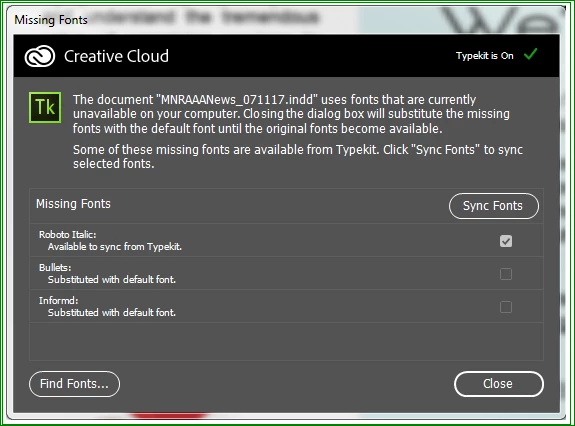
I have tried backing up the windows font folder, removing them from there and the registry, rebooting and re-installing, etc. I've tried it with Typekit off and I've also contacted Adobe support which wasn't all that helpful since the young lady in India really didn't seem to care. If we re-install the font daily we can use the document again. I wasn't sure if anyone has seen this or has any ideas on how to fix it? I'm not very good with Creative Suite as I don't use it but can normally figure out how to fix issues that arise. This one is a doozy so far.

[Moderator moved from Creative Suites to Adobe Creative Cloud.]

This topic has been closed for replies.
Correct answer mollybd

Unfortunately no, personal fonts can't be uploaded to Typekit. If they are installed in your local font directory, you should be able to use them in your desktop programs alongside Typekit fonts.

3 replies

Adobe Employee
August 8, 2017

Hi wisebastard,

This is Ben from Typekit support. I'm wondering if the issue you're seeing is for the Typekit font only or for other fonts in this document. The reason I'm asking is that I want to narrow down if the issue is Typekit related or possibly InDesign related.

Also, feel free to reach out to us here: support@typekit.com if this is urgent.

Cheers,

Benjamin

Participant
August 8, 2017

Ben, these are fonts that don't appear to be in Typekit. I hope that helps clear things up.

mollybd
Participating Frequently
August 8, 2017

It's difficult to troubleshoot issues with fonts that did not come from Typekit or Adobe, but it might help for the user to clear their font cache.

First, uninstall the fonts and back them up outside of the local font directory. Then follow the steps below:

1. Go to Start > Search > Files and Folders.

2. Choose 'Files and Folders' and type 'Adobefnt*.lst' into the Name-text field.

3. Make sure to activate the checkboxes 'Search in system folders, Search for hidden files and folders' and 'Search in subfolders'.   

4. Then click on 'Search'

5. Delete all .lst files listed.

6. Restart the computer.

7. Reinstall the fonts.

Let me know if this helps.

Best regards,

Molly

Participant
August 8, 2017

Molly, thanks so much for this, I will give this a try and let you know!

Nancy OShea
Community Expert
Community Expert
August 8, 2017
Nancy O'Shea— Product User & Community Expert
Participant
August 8, 2017

Nancy, thanks for the ideas too I will let you all know what I find out. I guess I'm a little naive and I'm not afraid to ask this question:

Can I add non Adobe fonts into typekit somehow?

mollybd
mollybdCorrect answer
Participating Frequently
August 9, 2017

Unfortunately no, personal fonts can't be uploaded to Typekit. If they are installed in your local font directory, you should be able to use them in your desktop programs alongside Typekit fonts.