davidg22927617
Participant
February 4, 2017
Answered

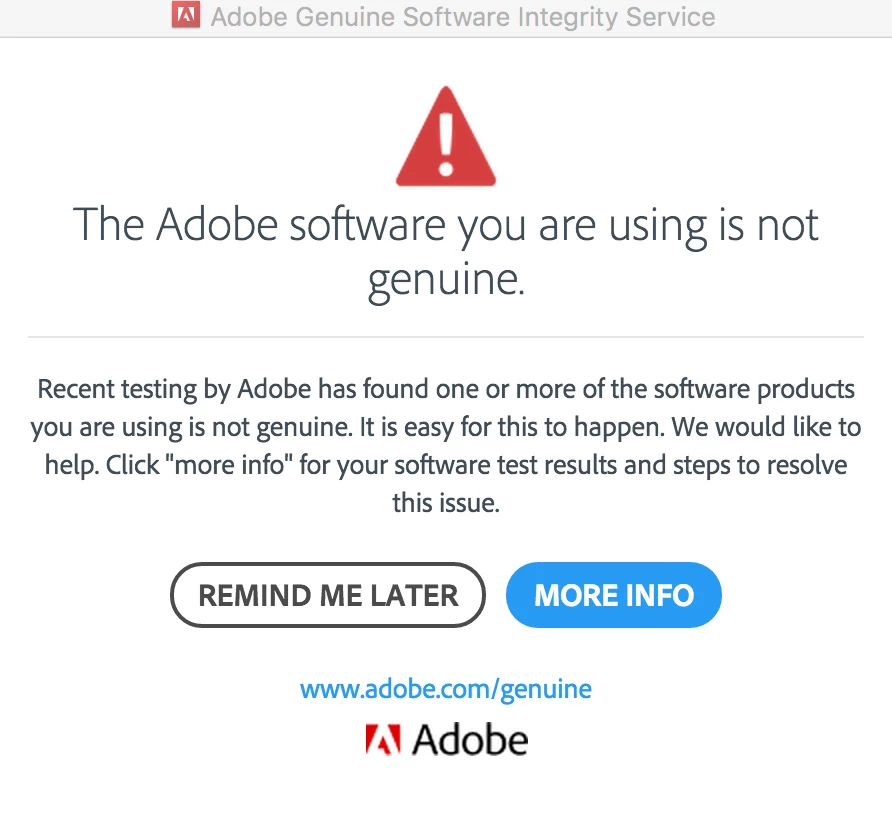
Has anyone had a POP-UP problem? I get a pop-up window that tells me the adobe software I have is not a genuine adobe product.

  • February 4, 2017
  • 20 replies
  • 51699 views

I haven't clicked on "more info" yet. Afraid it's phishing.
Correct answer Michael J. Hoffman

This is indeed legitimate, although the circumstances and causes of its appearance have been confusing in some cases. You can find more information at this link, including frequently asked questions:

Adobe Genuine software

This could be a result of software that has been tampered or modified, or a licensing issue. In any case, you should try to reach Adobe for help in correcting the issues causing this pop up.

Mike

20 replies

Participant
April 19, 2017

Ugh, I, too, began having issues with this today. . .

[Cougar scream].

I have a perfectly valid (and expensive!) copy of CS6 that I've happily been using on a Windows machine (8.1 now 10) for several years. I have held off on switching to CC because I live in an area with spotty internet service and sometimes have to operate "unplugged."

When I follow the "Adobe Genuine Software" alert link all my serial numbers pass, but the alert box pops-up every single time I open any Adobe program on my computer.

Product  Serial Number Licensing Status Tampered Software
AcrobatPro 10.*1118################9359
1543################2837
Pass
Pass
Illustrator CS61543################2837Pass
InDesign CS61543################2837Pass
Photoshop CS61543################2837Pass

I am a graphic designer and a photographer and these programs are vital tools for me. Constant false accusations implying that I've pirated software that I've paid for is causing me to lose time, money, and my temper.

If a robot sent by Stanley Tools rocked up at a cabinetmaker's shop and falsely accused the proprietor of stealing tools that they had paid for with hard-earned cash every single time they used them that person's work would suffer tremendously, as mine has today.

Adobe: you must issue a fix for these false positives -- you are wasting your customer's valuable time, money, and (most importantly) patience.

Participant
April 19, 2017

Said the same thing to them when i called in today!  Every single time i opened to do work probably 20+ times today i got this insane time consuming popup that would not just close out.  Wasting valuable time, money and patience is out the door!  Adobe PLEASE FIX THIS NOW.  Cannot afford for this to crash on me!!!

Participant
April 18, 2017

I am having the same issue, totally unacceptable.

AcrobatPro 10.*

1118################9359
1543################0505
Pass
Pass
Dreamweaver CS61543################0505Pass
Illustrator CS61543################0505Pass
InDesign CS61543################0505Pass
Photoshop CS61543################0505Pass

why is this happening!!! do not have time for this.

Known Participant
April 18, 2017

I am having the same problem with CS5 on a Mac. I used live chat and they told me my version is in fact good but that I would have to re-install the programs to stop the alerts. Thanks Adobe!!! Ad spyware to my programs without my knowledge, use it to make false claims and then make ME have to go through upload hell to fix it. Can't you just mark my program serial number as verified so the pop ups stop?

Terri Stevens
Legend
April 18, 2017

Hi Claire,

I am not sure just reinstalling will solve the problem as others have tried that without success. The solution as far as I am concerned is for Adobe to issue you with a new serial number and for that to be used during a reinstall.

This problem stems from a 'service' introduced last Summer that detects pirated copies of Creative Suite and Cloud products. The service isn't spyware, in fact if it detects fraudulent copies of Adobe programs it doesn't even tell Adobe. Instead it's 'nuisanceware' and is designed to be annoying for software thieves. The service seems to work with everything but some installations of Creative Suite 5, this may be because Adobe didn't test thoroughly enough as CS5 is discontinued, but I doubt if the company can admit that.

Do a reinstall and see if the problem goes away. If it doesn't get back to Adobe on the 'chat' applet and tell them the Photoshop forum has told you the problem can be solved by them 'remoting' to your Mac and having a technician reinstall the program using a newly assigned serial number. You will need proof of purchase such as an Adobe invoice though to get help.

Beverley Gray
Community Manager
Community Manager
April 18, 2017

Hi Terri

A new serial number will not be required for re-installation when the customer has a valid serial number.

We would advise customers to contact our support team for further assistance.

Kind regards

Bev

Participant
March 18, 2017

I have the same problem. All my software was bought from Adobe. I still have CS5 installed as well as CS6. I'm not going to go to CC. Some of the plug ins that I use for work will only run on CS5 so I still have it installed. But everything is genuine, bought directly from Adobe. I guess they are just going to force us to go to CC...

Beverley Gray
Community Manager
Community Manager
March 20, 2017

Hi chadtrent

It appears to be the CS5 version that's causing the issue.

Please contact our support team for assistance.

Kind regards

Bev

Participant
April 16, 2017

Everyone of my products "Passed" the serial number check. Why am I getting dozens of this popup today? And are we each going to have to individually complain about this to hope that one single "Staff" at Adobe will respond?

Participant
March 1, 2017

From:

If you dismiss the first notification when it comes up, and wait for your second notification, the second one will have a link to an Adobe landing page - and that page will include a unique ID number to use as a reference and a number to contact the Adobe Genuine Helpline to call for assistance.

That's been the best way to get support for this issue.

Mike

Reply:

When you call the telephone number and give them the unique ID, you spend 20 minutes waiting, then they spend 20 minutes talking to you about the problem and refer you to the chat.  On the Chat they tell you the wait is 6 minutes, 40 minutes later a chat specialist comes on the line and asks you to describe the problem.  After another 10 minutes of chat he refers you to another chat specialist who once again asks you to explain the same problem you've already described in the previous chat.  Now the second chat disconnects you because they can't explain or solve the issue.  I have all the legal software, Adobe Acrobat proX, and CS 5.5  and CS 6,  and it was all purchased from Adobe and is registered on their website.  So there must be something wrong with Adobe's Customer Service.

Beverley Gray
Community Manager
Community Manager
March 1, 2017

Hi TH

Sorry for the inconvenience caused.  I'll ask the support team to follow up with you to check that the correct serial numbers are being used as your account has a couple of serial numbers that were cancelled and re-issued.

Kind regards

Bev

Participating Frequently
March 1, 2017

I have spoken to the support team, They insist that my software is not genuine even though I know it is! Even when I click on the link from the pop up page it says that my software scores a  "Pass", which according to the support website means the serial numbers are valid! I have had a number of emails since then from the "support team" trying to sell me software !!that's what this is about! They have no interest in supporting me of solving the issue, they only care selling me a subscription to the cloud! I expect this to be fixed!!!

Participant
February 8, 2017

This just started to happen to a licensed, transferred copy of CS6.   I have been using this copy since Adobe validated the license and allowed the software to be installed as valid twice since the transfer in Sept 2014.  It was originally purchased on Ebay in the original box.  Going back to the seller 2 1/2 years ago is not an option.    I'm disgusted with Adobe having validated the serial and software several times until this week.   I can't help but think it's an obvious play at getting more people to upgrade to CC Cloud.   Since my license "Passed" on all the components of CS6 and show blanks in the tampering field of their "Non-Genuine Software" landing page, I called the number.   The (Indian) CSR asked for my email on my Adobe ID and then informed me that although the license was valid, that this was "Tampered Software".   I asked for a letter with some proof that this is tampered software and why it has been working fine and validated by Adobe 4x since Sept.   They sent me a "Cased Closed" notice.    Anyone up for a class action suit?

davidg22927617
Participant
February 8, 2017

Sounds great!!! I went directly to Adobe, not responding to the POP_UP and complained. It hasn't popped up since

Participant
February 7, 2017

Legitimate, sure, but unnecessary and incorrect. It seems it's happening because we have older software, and is definitely a glitch. My software is licensed, and 'passing' all of the tests, but it's still popping up.

Terri Stevens
Legend
February 7, 2017

If you are certain your software is 'genuine' then contact Adobe at the link below via the 'chat' option. There are many cases of people buying fake versions of CS quite unaware they have been fooled into buying a pirated version -sometimes at full price. The validation checking is now picking up on those copies in the same way Microsoft detects fake versions of it's products and I'm afraid if your copy is one of those versions you'll have to accept you have been had.

However we did see last week that a small number of completely genuine customers have been identified during validation and this must reflect a glitch in the validation checking service. If you can prove ownership with an invoice or a registration of the software at Adobe, I would suggest first asking Adobe to confirm at their end your serial is genuine and with that confirmation 'demand' they issue a new serial for a tech to use by remote desktop to install. Adobe technical support is likely to take the view you have a phoney copy as that is the official company line and they don't look at this forum, Do not take no for an answer. If necessary take the operators name and shame them here as they have no right to deprive you the use of software as expensive as CS.

Contact Customer Care

Participant
February 7, 2017

Thanks! Contacting them now...I've no doubt about the software as it was purchased through Adobe  .

Michael J. Hoffman
Community Expert
Michael J. HoffmanCommunity ExpertCorrect answer
Community Expert
February 4, 2017

This is indeed legitimate, although the circumstances and causes of its appearance have been confusing in some cases. You can find more information at this link, including frequently asked questions:

Adobe Genuine software

This could be a result of software that has been tampered or modified, or a licensing issue. In any case, you should try to reach Adobe for help in correcting the issues causing this pop up.

Mike

Terri Stevens
Legend
February 4, 2017

you are the third user in two days with this issue. The message does come from your Adobe software and can be very difficult to remove

John T Smith
Community Expert
Community Expert
February 4, 2017
Terri Stevens
Legend
February 4, 2017

I wonder if it is just coincidence that Adobe has started validation just when some big price increases are due to be introduced?
