

Participant
November 17, 2018
Question

Help!!! Paid Creative Cloud All Apps but showing not in your plan

  • November 17, 2018
  • 10 replies
  • 9303 views

Do anyone know whats going on?? i has been already paid for this , but i won't able to use.... WTF......
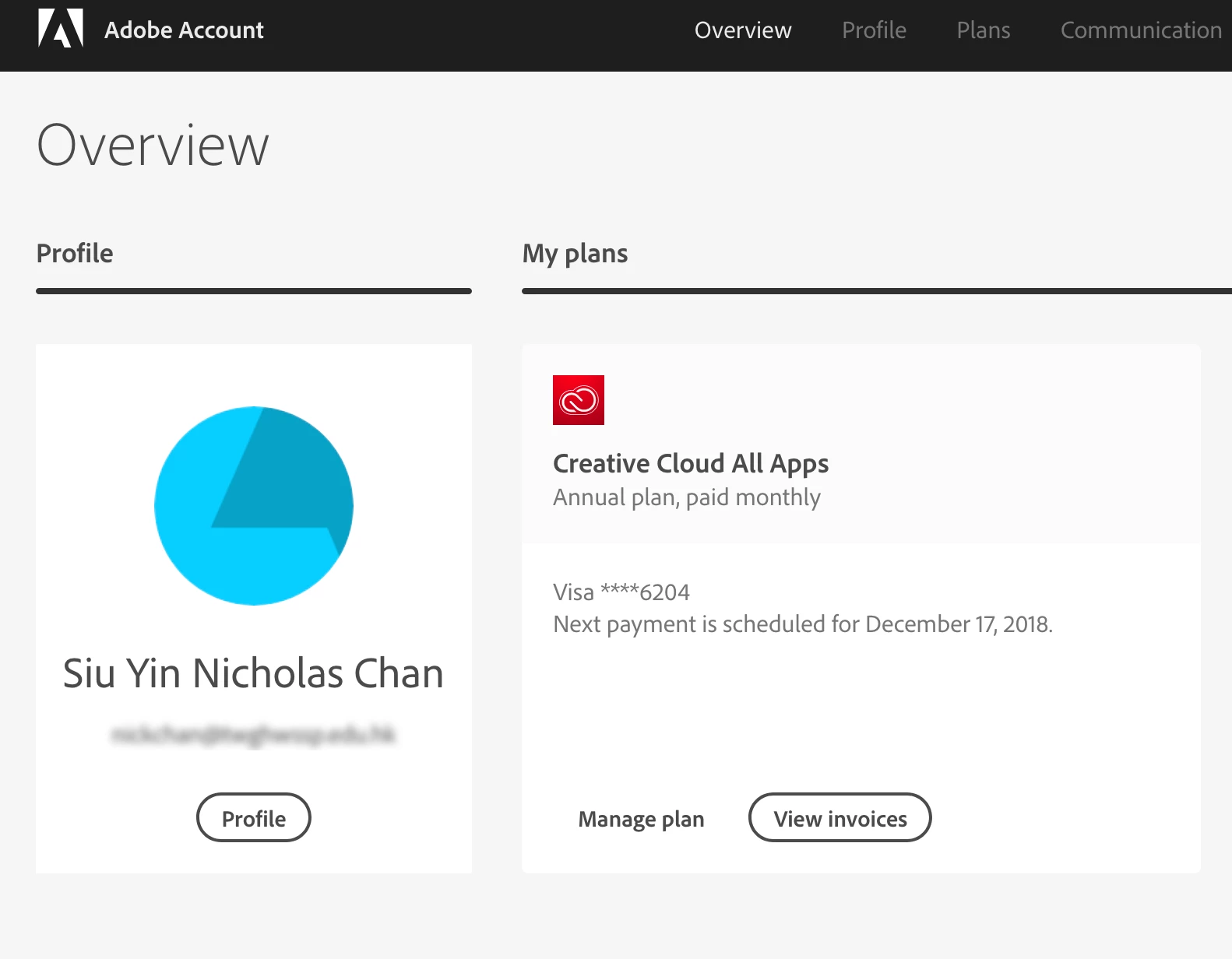
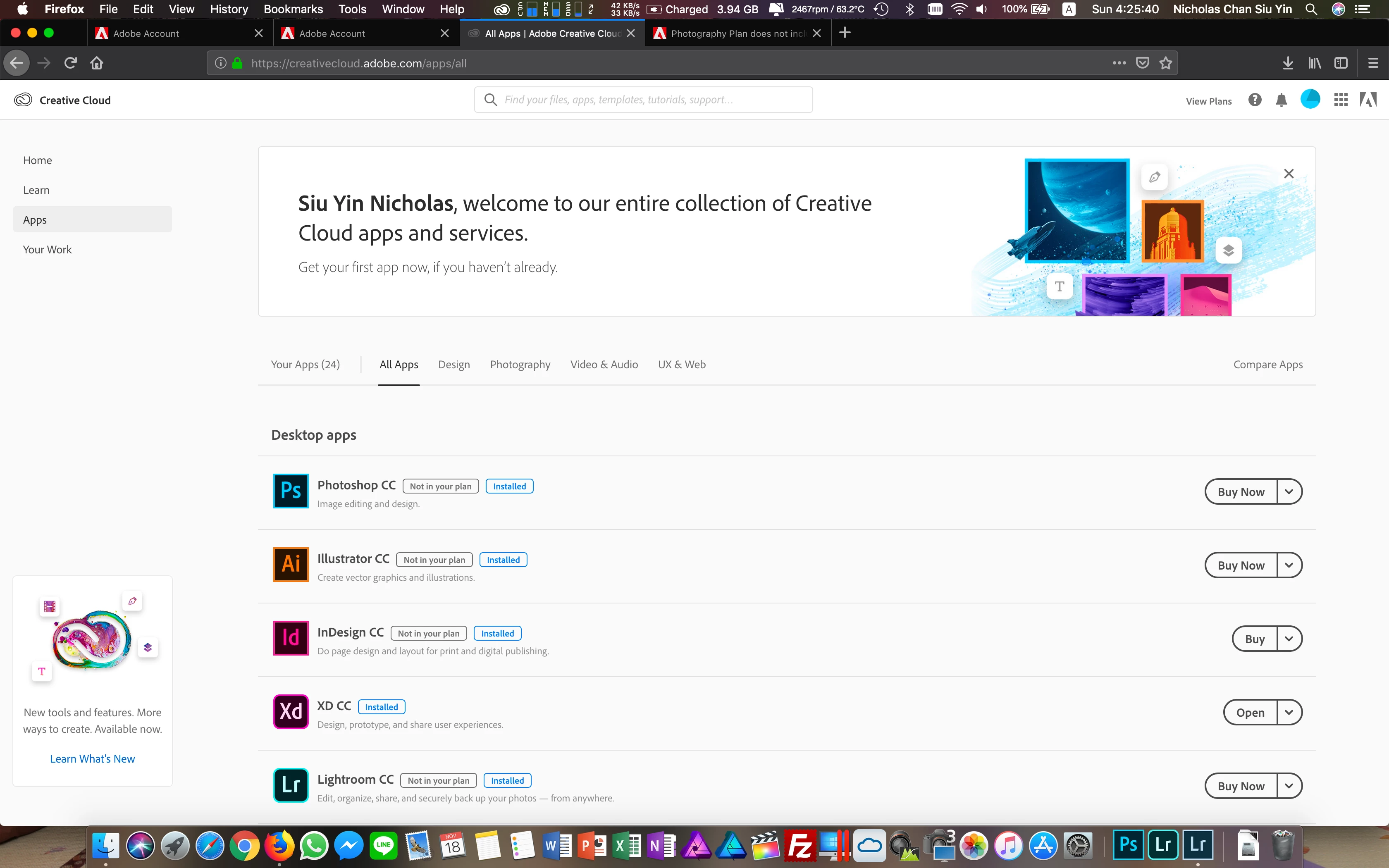
Message was edited by: Jeff Wright to remove personal information

This topic has been closed for replies.

10 replies

Participating Frequently
November 30, 2018

I have contact adobe support again and again. Finally, They accept my advice. Adobe confirm the issue is from their side, not your/clients computer!!

Shantanu Narayen  allow their team made these basic mistakes. They didn’t do any test before  sent the  bug resolve confirmation

e-mail, Their teams like a kids.They make twice basic mistakes. How about adobe support?  They don’t believe their clients, they working like a robot. Copy and paste everyday. That’s why the issue can not be resolve. Do you think adobe will resolve the issue?! maybe 1 years or two years later….

Please dismiss the CEO - Shantanu Narayen. He can’t management their team well, maybe he don’t have any management skill. To make adobe growth up, please dismiss Shantanu Narayen!!!!

Participating Frequently
November 29, 2018

Actually, I have contact supporter, they're not helpful. They told me is my computer issue. I already clear all of files and setup on brand new computer and Mac. Have same result:

Seem as they don't want to fix it.

Jeffrey_A_Wright
Community Manager
Community Manager
November 29, 2018

Shinn1w, Cty767685, Vatnið, Bonnica.y, and Garyhollow can you each please confirm which country you are located in?

Shinn1w, I reviewed the membership, under the e-mail address you posted, but I am not finding an active membership associated with that account.  Did you purchase the membership directly from your educational institution?  If so, then please work with them to determine why the membership, has not been activated.  Shinn1w, if you did not purchase the membership from your education institution, then please work directly with our support team at Contact Customer Care so that any account related difficulties can be resolved. 

I will also be editing your original post as you are posting in a public discussion forum, Shinn1w, which is accessible to anyone with Internet access.  Personal details such as e-mail addresses should never be shared in such a public setting.

Vatnið
Participating Frequently
November 29, 2018

I'm in Hong Kong.

The words "not in your plan" has disappeared from the Adobe site after your patch, but when I open Photoshop (which is part of my All Apps plan) it still says "6 trial days left".

bonnica.y
Participant
November 28, 2018


Help。。。anyone got the same problem here?

Vatnið
Participating Frequently
November 28, 2018

Same problem for me. The "not in your plan" sign has disappeared but when I open the applications, it still says "7 trial days left | Buy now".

kglad
Community Expert
Community Expert
November 28, 2018

check your account to verify your subscription is what you expect and to verify your adobe id (used in the next step), https://accounts.adobe.com/

if your account shows

a. your subscription is active,

1.  sign out and then back in to your cc desktop application using the same adobe id above to verify your subscription:  http://helpx.adobe.com/creative-cloud/kb/sign-in-out-creative-cloud-desktop-app.html

2.  if that fails, https://helpx.adobe.com/manage-account/kb/stop-creative-cloud-trial-mode-after-purchase.html

3.  if that fails, https://helpx.adobe.com/creative-cloud/kb/cc-reverts-to-trial.html

4.  if that fails, using a browser that allows popups and cookies,  contact adobe support during pst business hours by clicking here and, when available, click 'chat', http://helpx.adobe.com/x-productkb/global/service-ccm.html

if your account shows

b. you have no subscription and you're paying for one

1. using a browser that allows popups and cookies,  contact adobe support during pst business hours by clicking here and, when available, click 'chat', http://helpx.adobe.com/x-productkb/global/service-ccm.html

Participating Frequently
November 28, 2018

Hi all~ Seems they finally fixed the bug. I can download all apps on CC. Check this out: Adobe Creative Cloud

Participating Frequently
November 28, 2018

They have updated the status on adobe website, "not in your plan" has been removed.

But have you open or re-install your apps? still on trial period.

Participating Frequently
November 27, 2018

Finally contact HK support. They told me that it is a bug for Educational Plan and it only happens in HK. They are fixing it. So... all we need to do now is wait...

Participating Frequently
November 27, 2018

Their support always lie, Please report the issue to Hong Kong Consumer Council.

website: Trade Descriptions Ordinance | Consumer Council

bonnica.y
Participant
November 25, 2018

I got the same problem, paid for the plan and show the apps are not in my plan.

Participating Frequently
November 24, 2018

I have contacted the adobe support and waste few hours for nothing!!! They just remote to my mac and reinstall the app!!! I keep telling them it is not my mac issue... but the indian don’t listen and tell me my adobe account is fine... so I think I my wait for monday and connect local support...

ericchan0627
Participating Frequently
November 25, 2018

I think the problem is their account server, absolutely not the problem of the computer settings. Did you purchase it from Black Friday Promotion? Beside the software, I have been given 100Gb cloud space already, definitely the payment was successful! It's really disappointed that such a big company ADOBE only can contact with them through telephone hotline during office hr, not even a customer service email for solving the problem during weekend.

Participating Frequently
November 24, 2018

I have the same problem here!!! Just search it on Google and bring me here!

kglad
Community Expert
Community Expert
November 24, 2018

@eric and @gary, see message 1 and install the cc desktop app.

ericchan0627
Participating Frequently
November 24, 2018

I have reinstall my Mac already, nth change. I have tried it with my windows destop without any adobe software, same thing happened. I am sure it is my account problem then.

ericchan0627
Participating Frequently
November 24, 2018

I have this problem too, cant fix it yet

kglad
Community Expert
Community Expert
November 17, 2018

install the cc desktop app from here https://creative.adobe.com/products/creative-cloud and use it to install your adobe subscription and trial programs.

[ moved from Downloading, Installing, Setting Up to Creative Cloud Download & Install]

Participant
January 27, 2023

 I have the same problem 🤯🤯🤯🤯 why is this so difficult to use. Paying for two months now and I don't know how to get it on my computer let alone use it. 

kglad
Community Expert
Community Expert
January 27, 2023

@Trista281295338w07 


are you in hong kong?