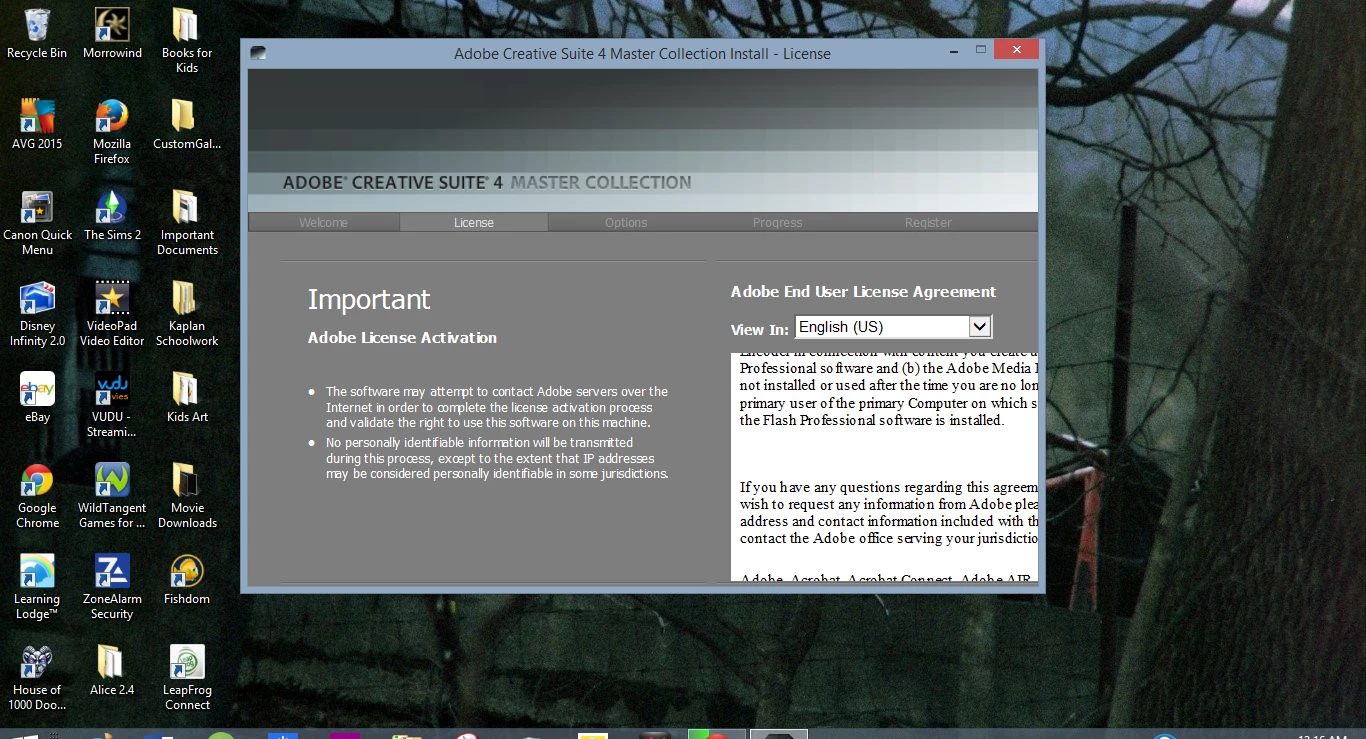
Hi, trying to install CS4 on my new laptop, dialog box is too small, I cannot click the accept button for the user agreement!
I had no problems withe the registration, but when I go to accept the agreement and begin the download, the actual screen (dialog box) is too small for me to click Accept. I have Windows 8.1 now, and I am unable to change the size of the dialog box. I can scroll up and down and see half the agreement, I have tried using keys, enter, etc, and I can't get past this page! It is making me insane! I am going to try a different installer since I'm using CS4, and it is kinda old. But I really need Photoshop! I have included a screen shot if anyone can help or has an idea, so you can see exactly what I mean. It is bizarre, and like I said, I cannot change the size of this box, the only thing I can do is scroll the agreement some... Thanks a bunch!!
 AdChoices