
Participant
December 19, 2019
Answered

How can I get rid of that stupid desktop app?

  • December 19, 2019
  • 2 replies
  • 624 views

I don't know when adobe took the liberty of installing software without my permission, but I only want the tab drop down from my OSX menu bar,  I don't need another stinking window opening up to dominate my desktop.  How do I turn that desktop app off?
This topic has been closed for replies.
Correct answer bucksommerkamp

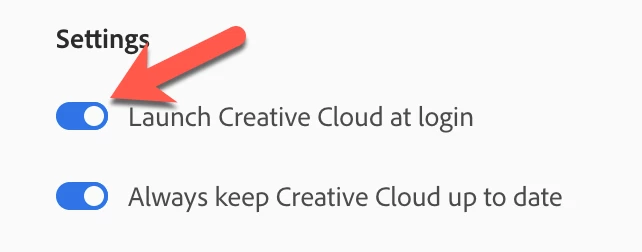
The desktop app will only open when you want it to if you click the "gear" icon and turn off the "Launch Creative Cloud at Login" option. 


2 replies

Participant
June 12, 2020

Man, you presume to fix yourself on my menu bar, even after I've thrown everything of this app out and then make it difficult, take a half hour to find a way to get rid of the icon fixed at the top of my screen. If I didn't want this to start with, think what I don't want now. Just tell me how to get rid of the icon and anything else related to CC.

bucksommerkamp
Community Expert
bucksommerkampCommunity ExpertCorrect answer
Community Expert
December 19, 2019

The desktop app will only open when you want it to if you click the "gear" icon and turn off the "Launch Creative Cloud at Login" option.