Known Participant
September 14, 2026
Answered

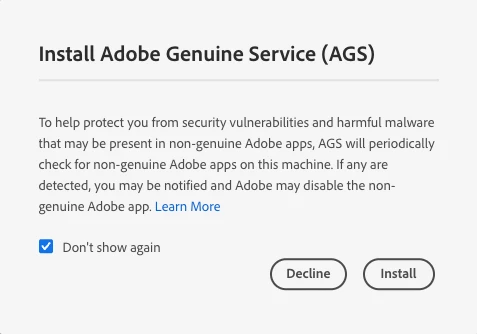
How can I stop receiving a pop up about the Adobe Genuine Service

Is there anyone at Adobe that can get this to STOP coming up?

I guess Adobe doesn’t know what DECLINE MEANS.


    ShivangiGupta
    ShivangiGuptaCorrect answer
    Community Manager
    September 25, 2026

    Hi ​@Christopher3440329747o5,

    The Adobe Genuine Service (AGS) is a background utility that checks whether the Adobe applications installed on your computer are genuine. I would recommend you to keep it installed on your computer.

    We find that many customers are unaware they have installed or purchased Adobe apps and services that are not genuine and may need additional information to address the situation. Therefore, we recommend that you continue to run AGS on your machine.

    Only genuine Adobe apps and services provide the latest features and functionality, including ongoing access to support and the latest security updates. Therefore, in an effort to block fraudulent activity and help safeguard your machine, Adobe may disable the identified non-genuine Adobe app.  

    You can refer to this article for more details: https://helpx.adobe.com/genuine/faq.html


    Let us know if you have any additional questions.


    ^Shivangi

    ^Shivangi

    3 replies

    ShivangiGupta
    Community Manager
    ShivangiGuptaCommunity ManagerCorrect answer
    Community Manager
    September 25, 2026

    Hi ​@Christopher3440329747o5,

    The Adobe Genuine Service (AGS) is a background utility that checks whether the Adobe applications installed on your computer are genuine. I would recommend you to keep it installed on your computer.

    We find that many customers are unaware they have installed or purchased Adobe apps and services that are not genuine and may need additional information to address the situation. Therefore, we recommend that you continue to run AGS on your machine.

    Only genuine Adobe apps and services provide the latest features and functionality, including ongoing access to support and the latest security updates. Therefore, in an effort to block fraudulent activity and help safeguard your machine, Adobe may disable the identified non-genuine Adobe app.  

    You can refer to this article for more details: https://helpx.adobe.com/genuine/faq.html


    Let us know if you have any additional questions.


    ^Shivangi

    Translate
    ^Shivangi
    Nancy OShea
    Community Expert
    Community Expert
    September 21, 2026

    The way to stop it is to uninstall the offending application from your computer hard drive.


    Translate
    Nancy O'Shea— Product User & Community Expert
    kglad
    Community Expert
    Community Expert
    September 14, 2026

    not really.

    Translate