Answered
How do I fill in a custom shape with color? Fill option is greyed out
How do I fill in a custom shape with color? My shapes will not give me the option to fill with color. I've watched tutorials, now Im just frustrated...
How do I fill in a custom shape with color? My shapes will not give me the option to fill with color. I've watched tutorials, now Im just frustrated...
Did you make the custom shape in shape mode?
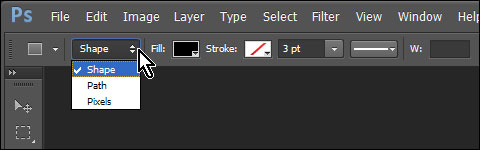
If you are in path mode, choose the Path Selection Tool, right click in the shape and choose Fill Path.
Fenja
Already have an account? Login
Enter your E-mail address. We'll send you an e-mail with instructions to reset your password.
 AdChoices