
Participating Frequently
January 7, 2014
Answered

How do I get my CS2 PREMIUM?

  • January 7, 2014
  • 1 reply
  • 5006 views

Here's my problem:

I have the Adobe CS2 Production PREMIUM.

I had to uninstall it because of a virus.

I tried to re-install it from the discs but I can no longer install from the discs - so I called the phone # and was

sent here -  https://www.adobe.com/cfusion/entitlement/index.cfm?e=cs2_downloads - Friday to download my CS2 Production Premium.

I've downloaded all the files, installed and activated all of the software but I'm still missing many of the effects that I used to have.

So I came back to the chat yesterday and asked how to get the files that I'm missing.

I was told that CS2 is too old and to go to the forum to ask.

On the forum everyone tells me that the page I was sent to has what I'm looking for - but I don't see it.

The CS2_install_Win.pdf says there should be 7 files for CS2 Premium and 5 files for CS2 Basic.

This site only gives me the 5 files for CS2 Basic - but NOT the 2 other files for CS2 PREMIUM.

The 5 CS2 Basic files I can get from this site are:

1-CreativeSuiteCS2Disc1.exe

2-CreativeSuiteCS2Disc2.exe

3-CreativeSuiteCS2Disc3.exe

4-CS_2.0_WWE_Extras_1.exe

5-VCS2.zip

The files NOT on this site are:

CreativeSuiteCS2Disc4.exe & CS_2.0_WWE_Extras_2.exe

Where can I get these missing files so that I have the CS2 Production PREMIUM package that I paid for?
    This topic has been closed for replies.
    Correct answer sinious

    Well this is just terrific. Message #13 doesn't help me in the least--nor does the thread 1195856. I've got all the CS2exe files in the right folder, as kglad suggests, but it still keeps asking me to install disc2 after it's completed the disc 1 install. What I really need is step by step instructions on how to get the three CS2 exe files installed--to insure I'm doing everything right, but no one is able to provide that.

    So basically, I'm screwed. Thanks a lot Adobe.


    Self-extracting means that yes, when you click to run them, they should ask you where you would like to extract the files that are compressed and stored inside them.

    When you run the other disk executables, what do they do?

    If they do in fact ask you where to extract files to, either make a folder (anywhere you want) or point to an existing folder and allow them to extract their files to that location. Just make certain you point to the same location when you do this for any other disk executables.

    edit:

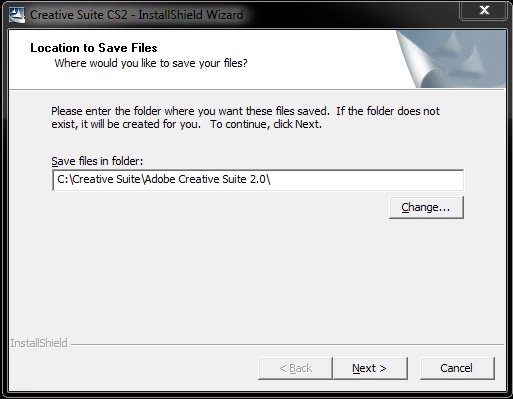
    Being I own CS2 I downloaded one of the files and yes, they are self extracting. This is the dialog you get when you run them:

    You need to run all the self extracting files and make sure the location is the same, then click Next, etc until it's finished extracting. Then run setup after all files have been extracted to the same location. You will get no more errors.

    1 reply

    kglad
    Community Expert
    Community Expert
    January 7, 2014

    you had plugins for some of your software?

    tgbvfrAuthor
    Participating Frequently
    January 7, 2014

    I did have plug-ins but that's not what I'm talking about.

    My CS2 Production Premium came with 'Keylight' and 'Cycore Effects' included

    in my AfterEffects7.0 Professional.

    I'm missing these effects.

    The site they sent me to download my software - because I can no longer use

    the discs - says there should be 7 files for CS2 PREMIUM edition & 5 files

    for CS2 BASIC.

    I've got the 5 files for CS2 Basic - I'm looking for the 2 CS2 PREMIUM files

    that I'm missing.

    Here are the 5 files I have:

    1-CreativeSuiteCS2Disc1.exe

    2-CreativeSuiteCS2Disc2.exe

    3-CreativeSuiteCS2Disc3.exe

    4-CS_2.0_WWE_Extras_1.exe

    5-VCS2.zip

    These are the 2 files I'm missing:

    CreativeSuiteCS2Disc4.exe

    CS_2.0_WWE_Extras_2.exe