gluecksmensch
Participant
April 25, 2018
Answered

How to disable ads notifications in Creative Cloud App?

  • April 25, 2018
  • 9 replies
  • 16032 views

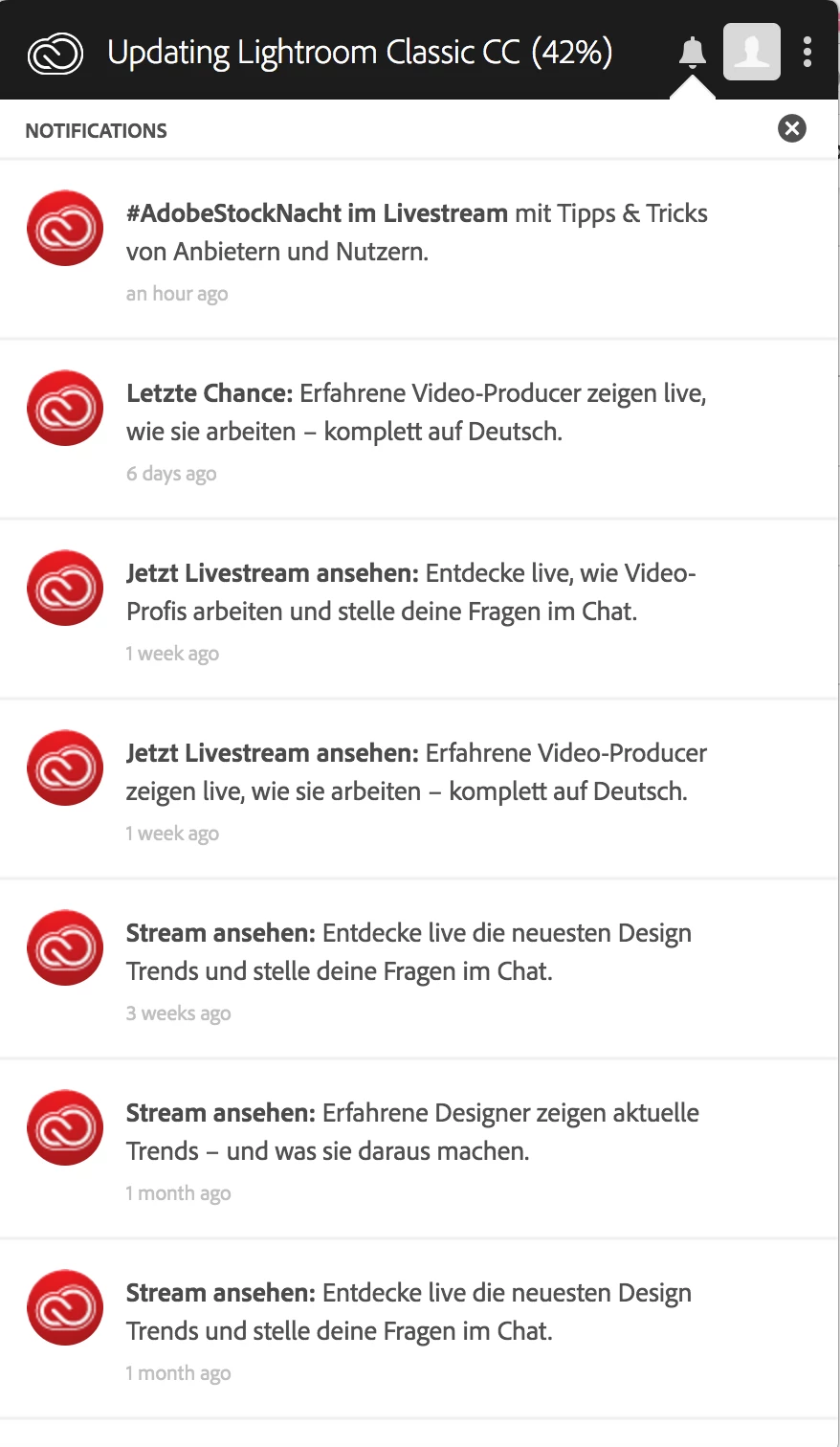
How to disable ads notifications in Creative Cloud App? I have unchecked all notification options under "Preferences" and I still get lots of Adobe ads notifications.

Correct answer Nancy OShea
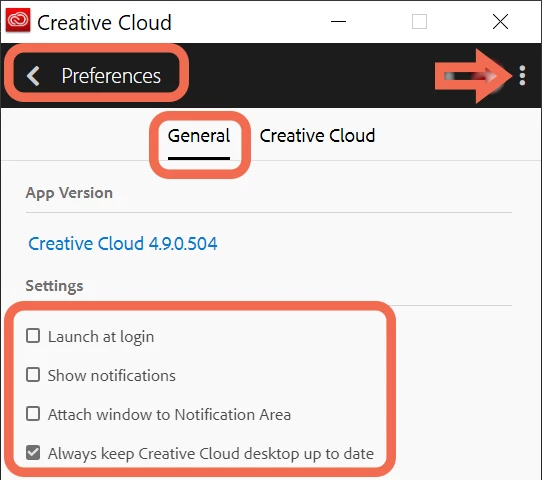
  1. Open CC Desktop App.
  2. Click the 3 dots icon by your avatar.
  3. From Preferences > General tab, turn off Notifications.  See screenshot..

9 replies

Participant
October 17, 2019

Please stop showing me this spam.

I already turned off all notifications, and the Adobe spam still keeps coming. Please stop.


Adobe has a privacy policy explicitly forbidding such behavior:

https://docs.adobe.com/content/help/en/campaign-classic/using/getting-started/starting-with-adobe-campaign/privacy-and-recommendations.html


About privacy and consent

Adobe Campaign is a powerful tool for collecting and processing extremely large amounts of data, including personal information. We encourage all users of Adobe Campaign to work within legislation (DPA, CAN-SPAM, European Directive on Privacy and Electronic Communications, European GDPR, etc.), make responsible and ethical use of personal information and refrain from sending unsolicited e-mail, push notifications and SMS messages ("spam"). We strongly believe in the principles of permission marketing in fostering customer lifetime value and loyalty, and we therefore strictly forbid the use of Adobe Campaign in sending unsolicited messages.


Instructions for filing a complaint:

https://www.consumer.ftc.gov/articles/0038-spam#report


Adobe routinely ignores complaints from users, so the next step is to report Adobe spam as a violation of the CAN-SPAM act:

https://www.ftc.gov/tips-advice/business-center/guidance/can-spam-act-compliance-guide-business


The CAN-SPAM Act, a law that sets the rules for commercial email, establishes requirements for commercial messages, gives recipients the right to have you stop emailing them, and spells out tough penalties for violations.


Despite its name, the CAN-SPAM Act doesn’t apply just to bulk email. It covers all commercial messages, which the law defines as “any electronic mail message the primary purpose of which is the commercial advertisement or promotion of a commercial product or service,” including email that promotes content on commercial websites. The law makes no exception for business-to-business email. That means all email – for example, a message to former customers announcing a new product line – must comply with the law.


Each separate email in violation of the CAN-SPAM Act is subject to penalties of up to $42,530, so non-compliance can be costly.


Participant
September 25, 2019

Agree.
I don't need to see a red dot notification that when I click it tells me about some Adobe Live event.

Please offer a setting to disable such distractions.

psamathe_net
Known Participant
March 3, 2020

These are driving me up the wall. Today I starte dlooking at Capture One I'm getting so anoyed by this. I pay Adobe quite a lot of money each month and don't expect to be SPAMed by them trying to get more. Free services (Google, Facebook, etc.) then they use Ads to effectively pay for yopur subscription. I pay a lot. I'm ready to ditch Adobe, partly because they are intensely anoying and part because of the attitude it shows Adobe have,.

Nancy OShea
Community Expert
Community Expert
March 3, 2020

Did you disable notifications from your Creative Cloud Desktop app?  I keep my CC desktop app closed when I'm not using it.  So I don't see ads.


Ads in email or on YouTube have nothing to do with Adobe.  Most likely a p h i s h i n g scheme or the provider is monetizing their content with ads.   I recommend you get an ad blocker for your browser.


Nancy O'Shea— Product User & Community Expert
seriouswiggles
Inspiring
August 1, 2019

I'd like to add my vote to please remove the red notification dot for Adobe ads when notifications are turned off in preferences. Does anyone know if there's a better place to request this that will get more attention from Adobe? I can't imagine anyone wants it.

Abambo
Community Expert
Community Expert
August 1, 2019

seriouswiggles  wrote

Does anyone know if there's a better place to request this that will get more attention from Adobe? I can't imagine anyone wants it.

If you think it's a bug you should file a bug report:

Feature Request/Bug Report Form

ABAMBO | Hard- and Software Engineer | Photographer
Participant
September 18, 2019
Thanks for the tip. Bug reported. I continue getting these annoying spam notifications at least once a week and it's annoying as F!!!
Participant
July 26, 2019

EU GDPR to the rescue?

May be late to this party @gluecksmensch, but not sure if this could fall under, for us Europeans within the EU, new data protection legislation. I've not received any explicit requests to opt in from Adobe.  This may be a breach of European Law as consent has to be EXPLICITLY given. Same with cookies!

So Adobe, where's my explicit consent and my lawful right to opt out of this marketing off option?

Abambo
Community Expert
Community Expert
July 30, 2019

No, GPDR is something other. That protects your data stored with a company. Here you get notifications because you have a program running where you can switch off or opt out of the notifications. GPDR only jumps in, if there are data stored on Adobe web servers that are not relevant to do business with you. This here* is quite local on your computer.

*corrected at a later stage.

ABAMBO | Hard- and Software Engineer | Photographer
Participating Frequently
April 24, 2019

Hi, I'd like to add my voice to those asking for a way to disable these notifications properly. I click on the icon with the red dot thinking there's something important like an app update - but it's an ad for Behance or some competition. I simply am not interested in these.

In the meantime I will take the advice of others above and disable the CC app from opening at launch until this issue is fixed.

Participating Frequently
June 17, 2019

These notifications are useless and annoying. LET ME DISABLE THEM!

Just Shoot Me
Legend
April 3, 2019

Simply Set it to NOT Open at Login. With that the CC DTA will not open and will not show any notifications. If you need to open it to check app update you can still do that. Then EXIT out of it from the POP UP menu at the 3 DOTS.

Participating Frequently
April 3, 2019

Thanks, that's a good workaround. I'm hoping that re-installing the app will have resolved the issue and now the notifications will not appear. But if not, I'll use your method.

donbarrum
Inspiring
April 2, 2019

I don't mind getting notifications of software updates. But the daily spam of trying to make me subscribe to adobe stock photos is not ok. Though it has been more quiet lately, so I'm ok about it now - but there was a period I got multiple notifications of images I can buy, every day! ...that's not ok!!

Participating Frequently
April 2, 2019

I agree. When I see that red dot on the Creative Cloud app I always click it expecting to find an update for my apps. But over half the time it's about marketing spam. It's such a no-brainer to distinguish notifications about app updates from marketing stuff. It's ridiculous that Adobe can't seem to figure this out.

The worst part is we can't filter out the marketing spam, like you can in email. We need them to fix the app to have two different settings in preferences: one to enable/disable marketing notifications and one to enable/disable notifications about app updates. This is not rocket science.

Participant
August 10, 2018

Adobe can't be serious about this... these notifications are annoying. If I disable all notifications in an application I expect it to respect my wishes and stop pestering and harassing me with ads. gluecksmensch, did you find a solution for this annoyance or did you give up?

Adobe Employee
April 25, 2018

Hi Gluecksmensch,

I understand your query regarding notifications in the Creative Cloud app.

Kindly refer to this link  Creative Cloud notifications for more more information.

Hope it helps you. Feel free to reach out to us for more questions.

Regards

Chhavi


gluecksmensch
Participant
April 25, 2018

Thanks for your answer! No, these information do not help. I just had a chat with the Adobe support and this is the answer:

I have just spoke with my seniors and they are saying that there is no way to remove notifications.
Participating Frequently
April 2, 2019

Wow, what a ridiculous policy from Adobe! There is no way to turn off their notification spam?! It's insane for a company to insist on harassing their customers. Adobe: get a clue and stop going out of your way to make us unhappy with your service!