
Participant
November 27, 2021
Question

How to download lightroom classic 9

  • November 27, 2021
  • 3 replies
  • 13117 views

I want to instal LR classic 9, using creative cloud desktop on windows.

Here it's written than LR classic 9 is supported, so it should be available for download:
https://helpx.adobe.com/lightroom-classic/kb/supported-versions.html

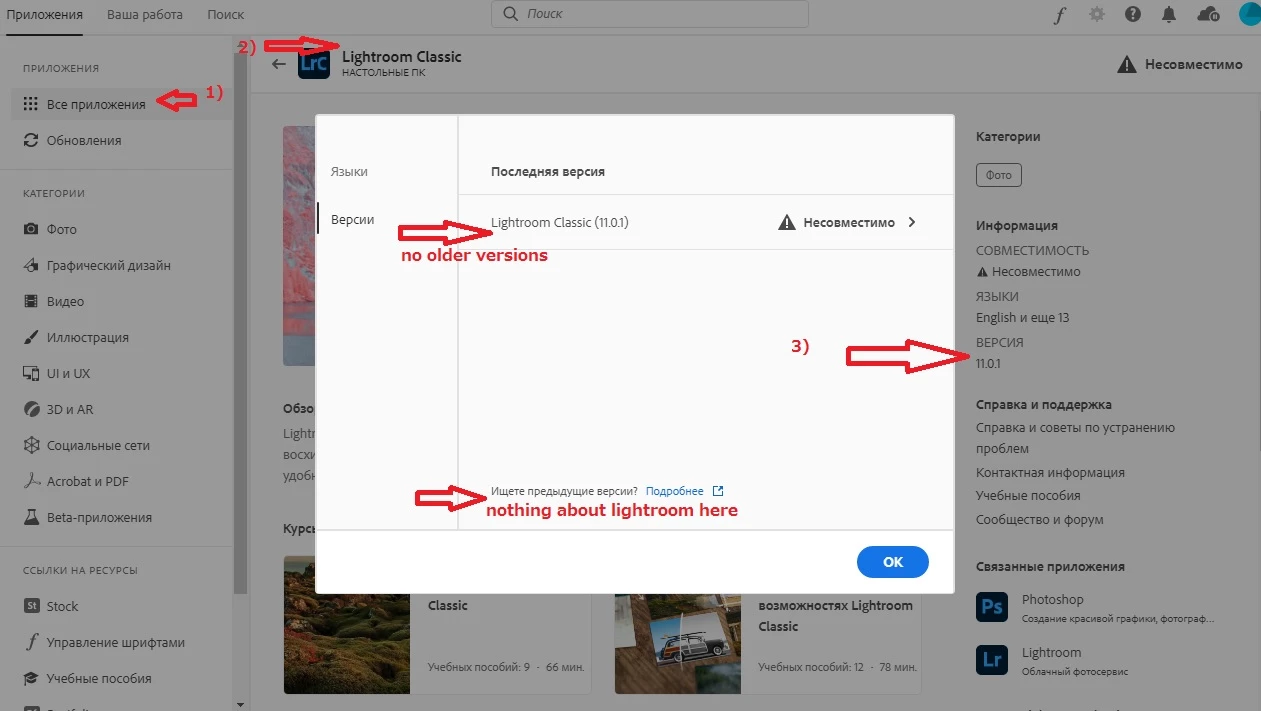
Current version of LR cannot be installed due to system requirements. When I click "version" on LR classic screen in creative cloud I see only last version, and link "read about older versions", it leads here:
https://helpx.adobe.com/download-install/kb/download-availability.html
There is nothing about lightroom. 

Setting "show older versions" is enabled. But it doesn't help.

How can I install LR classic 9 on windows, using creative cloud?
    This topic has been closed for replies.

    3 replies

    John Waller
    Community Expert
    Community Expert
    November 27, 2021

    Here it's written than LR classic 9 is supported, so it should be available for download:
    https://helpx.adobe.com/lightroom-classic/kb/supported-versions.html


    Yes, that article became outdated around 4 weeks ago when Adobe held their annual Max conference and simultaneously released the next major versions of all their Cloud software apps. Since late Oct 2021, LR Classic versions 11 and 10 became the only versions available via the Cloud desktop app.


    quote

    How can I install LR classic 9 on windows, using creative cloud?


    You can't using the Cloud desktop app.


    You can directly download the Lightroom Classic 2019 (version 9) installer from this website and try that.

    https://prodesigntools.com/adobe-cc-2019-direct-download-links.html

    Dotoki2
    Inspiring
    December 13, 2022

    Lightroom CC 2019 is version 8 not 9.

    The link on ProDesignTools page is for the file LR_8.0_1193777

    kglad
    Community Expert
    Community Expert
    December 13, 2022

    @Dotoki2 


    skip to the bold text and then **:


    you can install the latest and 1 version prior versions using the cc desktop app. you must have a subscription because previous versions are not available with trials.  other versions are revealed after clicking file preferences>apps>tick show older apps (at panel bottom).


    for versions cc 2019 and older, use prodesign tools.com*.


    for versions newer than cc 2019 but older than one previous version, contact adobe support for links.**


    * most adobe download links are available from prodesigntools.com. https://prodesigntools.com/adobe-direct-download-links.html


    follow the directions (esp, step 1)

    save the install file. it may not remain online.

    thank jim @ prodesigntools.com


    **there are 3 ways to contact adobe; chat, phone and twitter:

    chat:
    use a browser that allows popups and cookies, and click here, https://helpx.adobe.com/contact.html?rghtup=autoOpen
    in the chat field (lower right), type AGENT
    be patient, it can take quite a while to reach a human.

    phone:
    https://helpx.adobe.com/contact/phone.html

    twitter:
    tweet @AdobeCare

    p.s. if you're contacted by anyone (via email or private message), it's much more likely to be a scammer than an adobe representative. ie, double check for an employee badge if contacted in the forums and look for an adobe.com domain in the email address if you click reply to an email. then check again and be very suspicious. any other method of contacting (or offering to contact you) is almost certainly a scam, https://community.adobe.com/t5/using-the-community-discussions/staying-safe-in-the-adobe-support-community/td-p/12919684/redirect_from_archived_page/true.

    Nancy OShea
    Community Expert
    Community Expert
    November 27, 2021

    Adobe expects users to have the latest versions of software, no more than 2 versions back.


    LR Classic 9 is not available from my CC Desktop app.  Only Versions 11 and 10 are offered.   NOTE:  I have my Preferences set to Show Older Apps.  See screenshots.


    Preferences > Apps > Settings > ✓ Show Older Apps


    Hope that helps clarify things for you.


    Nancy O'Shea— Product User & Community Expert
    John T Smith
    Community Expert
    Community Expert
    November 27, 2021

    I do not know how far back this process will go, but try...
    Direct Download Links https://prodesigntools.com/tag/ddl MAY help
    -you MUST do what it says in Note: Very Important Instructions
    -https://prodesigntools.com/adobe-cc-2015-direct-download-links.html#download-instructions
    -the prodesign links go directly to Adobe's file server, so this process will
    --only work until Adobe completely removes the old version(s) from the server
    .
    IF/When you do have a download, be sure to copy it to AT LEAST one external device
    -since Adobe does sometimes remove old versions from the server
    -a usb flash drive or external hard drive, or write to a DVD