
Participant
September 8, 2017
Answered

How to I download Creative Suite 6 Design & Web Premium to a new computer?

  • September 8, 2017
  • 1 reply
  • 10446 views

First, I have already been through the forums trying to find a solution and haven't found one yet.

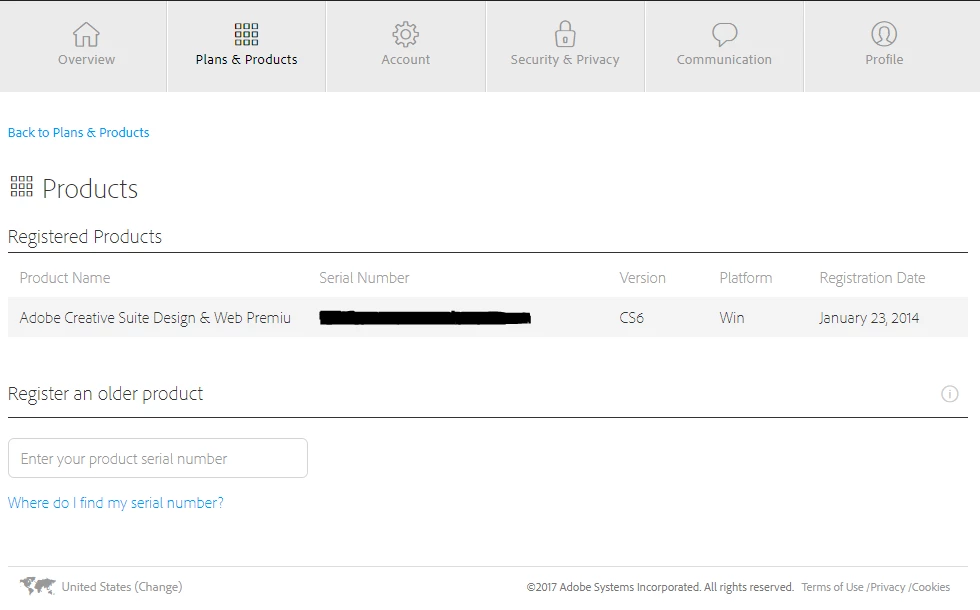
Here's the issue. My previous laptop is barely functional, so I had to get a new one. I wanted to download my CS6 to new computer and had trouble getting my old computer to function long enough to deactivate CS6 products. When I read that you can deactivate the programs through logging in to Adobe ID, I figured I was set, but when I log into my account, it has the product listed as registered with a serial number, but there's nothing under the "Plans" section. So I went back to the forums, but haven't found anything like my situation. I don't know if I've done something wrong, or maybe I missed something obvious, but I'm confused and frustrated. I added the photos below so you can see what I see. Any help would be appreciated. Thanks!

This topic has been closed for replies.
Correct answer Jeffrey_A_Wright

Kalyanih92322360 you can find complete details regarding the deactivation process, for Creative Suite 6, at Activate and deactivate Adobe products​.  Utilizing the De-activate option under the Help menu will allow you de-activate the software.  If you encounter any errors while activating on the new computer then please contact our support team directly at Contact Customer Care​.

1 reply

John Waller
Community Expert
Community Expert
September 8, 2017

Plans shows the status of your Creative Cloud membership, if any. If you don't subscribe to the Adobe Cloud, you won't see anything under Plans.

Your situation looks straightforward. You have your CS6 serial number.

So, on the new Windows computer, download CS6 from Download Adobe Creative Suite 6 applications

Install then enter your serial number.

Participant
September 8, 2017

Greetings,

I've been scouring the web looking for a solution to what is perhaps a similar issue.  I own a disk copy of CS6 Photoshop. I recently purchased a new iMac and want to put PS onto it.  Unfortunately, the iMacs no longer have a disk slot.  So, how can I continue to use my Photoshop?  I'm retired now and don't need nor can afford a subscription to the cloud.  What I have is sufficient for my needs.

Any assistance you can provide will be greatly appreciated.

John Waller
Community Expert
Community Expert
September 8, 2017

Unfortunately, the iMacs no longer have a disk slot.  So, how can I continue to use my Photoshop?

Follow the steps in my previous post above: download, install, enter your serial number.