
KrzysztofJanowski
Participant
July 29, 2019
Answered

How to install older versions of After Effects than 2016 CC

  • July 29, 2019
  • 2 replies
  • 10427 views

Hello

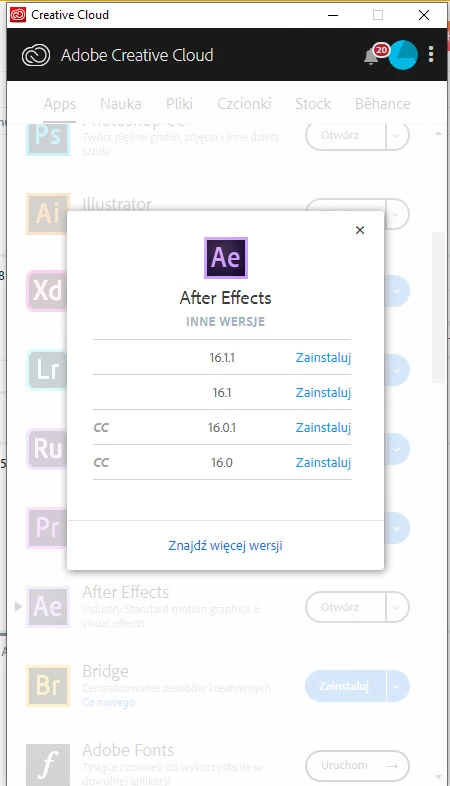
After formatting my disc and installing Creative Cloud again, i noticed that all older verions of After Effects (older than AE CC 2016) are missing in Creative Cloud App menu. Here is my question. How can I install these versions (2014, CC, and CS6). Are these versions just not available any more?

Having older versions, is crucial to work with older plugins, other artists or to make templates.

Thanks for answering

Best regards

Janek
This topic has been closed for replies.

2 replies

Nancy OShea
Community Expert
Community Expert
July 29, 2019

KrzysztofJanowski  wrote

How can I install these versions (2014, CC, and CS6). Are these versions just not available any more?

Janek,

As of May 2019, legacy CS6 is no longer part of Creative Cloud.   The only way to access it is if you previously purchased CS6 and have a valid serial number.  Without a serial number, the Adobe Customer Care agents can't give you a download link.

Likewise, older CC apps were removed from CC Desktop.   You may install the current version and the one previous to it.   But beyond that, you may have trouble finding a download as Adobe are removing old links from their servers. 

Contact Customer Care

Click the Chat Bot icon.

Type Agent and wait for a human to jion the session.

Nancy O'Shea— Product User & Community Expert
Correct answer
July 29, 2019