Participant
July 26, 2026
Answered

How to solve "error":"invalid_credentials" issue? It occurs whenever i open creative cloud!

How to solve "error":"invalid_credentials" issue? It occurs whenever i open creative cloud and open lightroom!
What can i do? I had already reinstall creative cloud but nothing change!

 

    kglad
    kgladCorrect answer
    Community Expert
    July 26, 2026

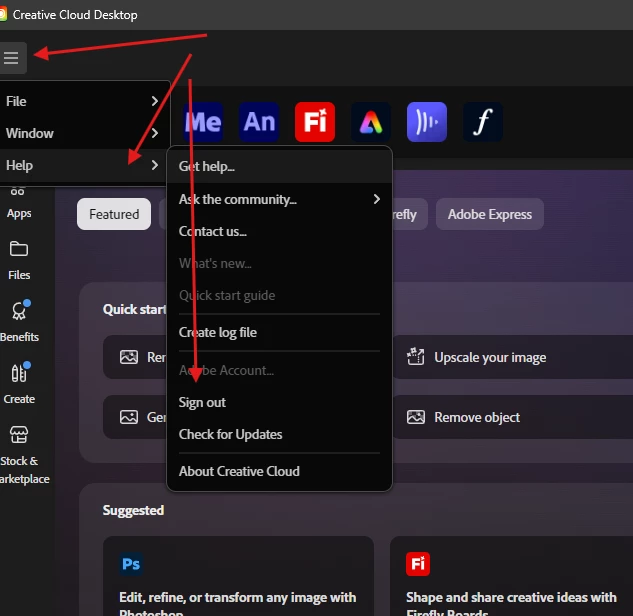
    sign out of the cc desktop app


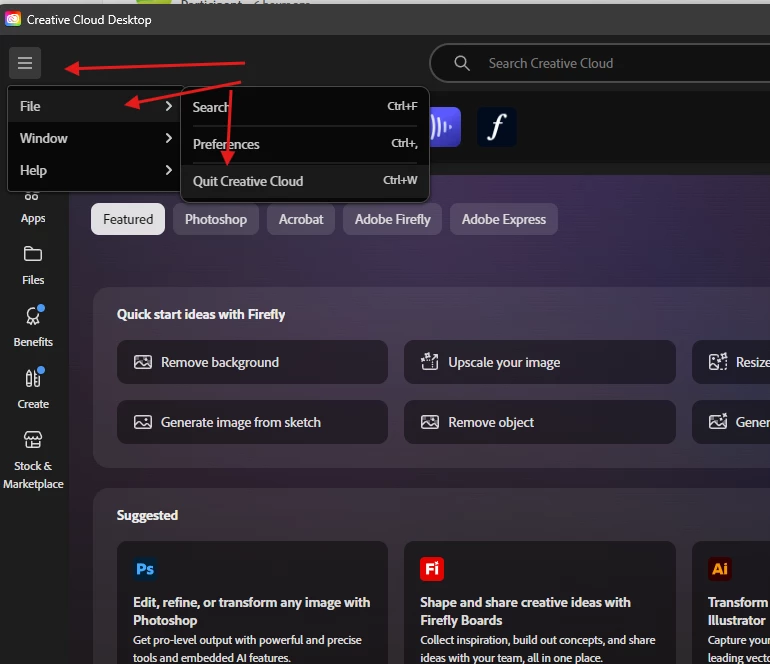
    then quit the cc app


    then clear your oobe folder

     win: C:\Users\<userrname>\AppData\Local\Adobe\OOBE

    mac: /users/<username>/Library/Application Support/Adobe/OOBE


    restart your computer

    open and sign into your cc desktop app


    •  

    1 reply

    kglad
    Community Expert
    kgladCommunity ExpertCorrect answer
    Community Expert
    July 26, 2026

    sign out of the cc desktop app


    then quit the cc app


    then clear your oobe folder

     win: C:\Users\<userrname>\AppData\Local\Adobe\OOBE

    mac: /users/<username>/Library/Application Support/Adobe/OOBE


    restart your computer

    open and sign into your cc desktop app


    •  
    Translate