
Answered
How to succesfully update Lightroom 2.3
hello,
How do I succesfully update Lightroom 2.3?
I already downloaded the update but it won't open.

hello,
How do I succesfully update Lightroom 2.3?
I already downloaded the update but it won't open.
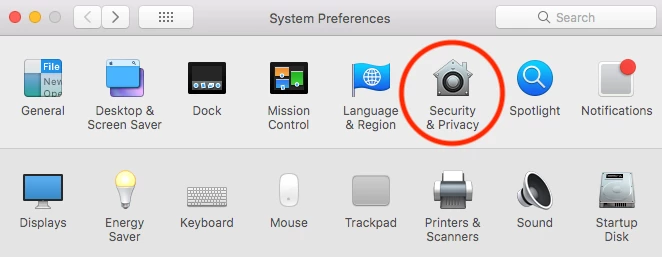
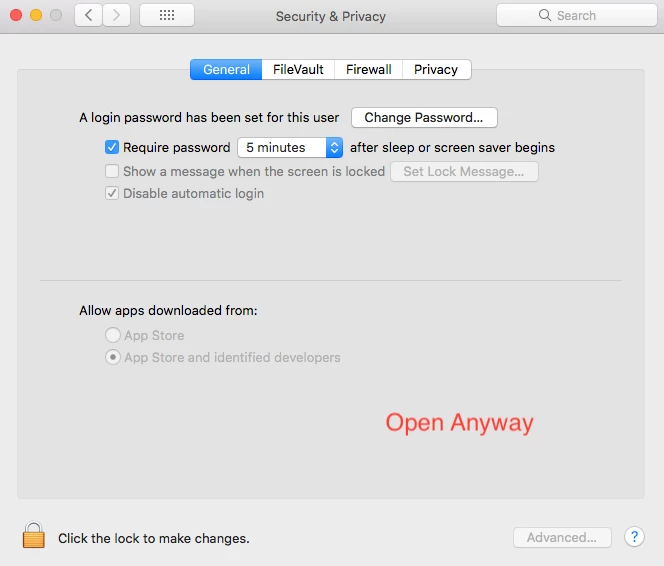
I'm also not sure what the message says, but if kglad's response doesn't help, you might also try looking at Security & Privacy in your System Preferences on your Mac. The messages looks like it's saying it's from an unidentified developer, so you need to tell your Mac that it's okay to open it.
Open your System Preferences and click on "Security & Privacy".
Then, if I think what is happening, is happening... you will see a button of some sort that says "Open Anyway" or something like that.
Good luck!  I hope that helps!
Already have an account? Login
Enter your E-mail address. We'll send you an e-mail with instructions to reset your password.
 AdChoices