Participant
September 29, 2014
Answered

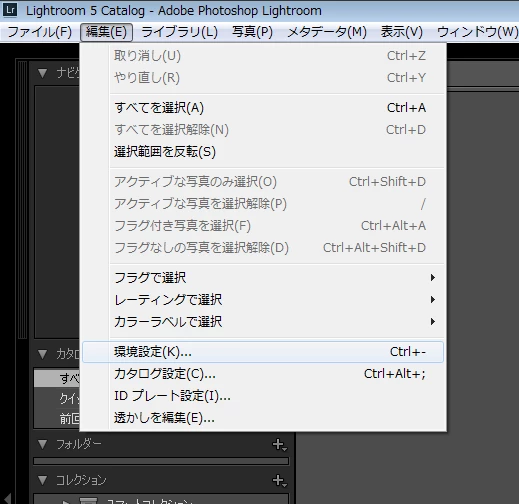
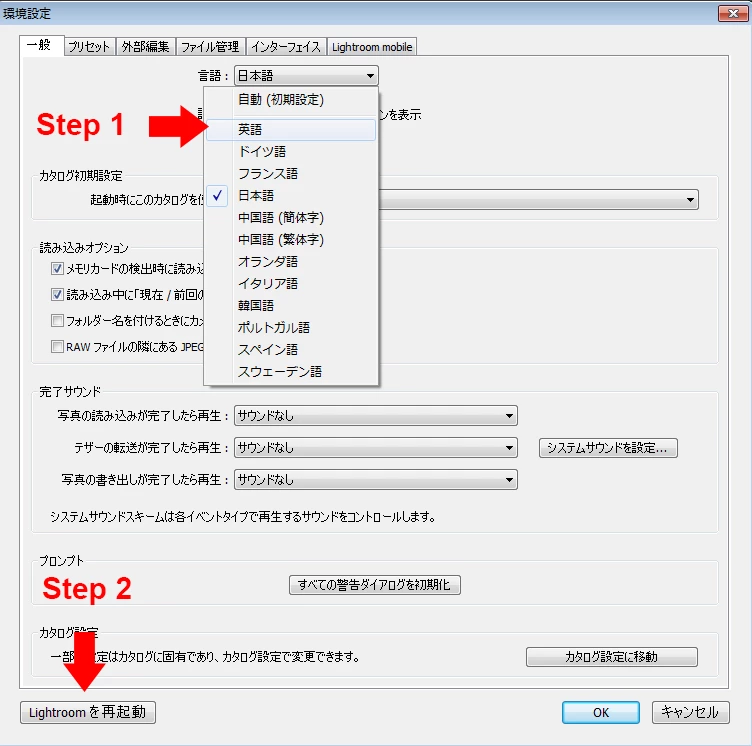
i am american. i moved to japan, i just set my computer up and lightroom is all in japanese now. i cannot read japanese. how do i change the language back/or to english? i can't read the menus to figure it out :(

  • September 29, 2014
  • 2 replies
  • 585 views

need help on how to change the language from japanese (which i dont understand) to english. cant read the menus to figure it out

This topic has been closed for replies.
Correct answer ディーゼルエンジン

Hi, liz m

Welcome to Japan forum.

Plz try this solution.

2 replies

ディーゼルエンジン
Inspiring
September 30, 2014

Hi, liz m

Welcome to Japan forum.

Plz try this solution.

kazuma_m-yuHVIV
Participating Frequently
September 30, 2014

Sorry, i'm not good at english.

If your Lightroom is Creative Cloud, you can change the language.

Step1. Change language setting in Creative Cloud Desktop Application.

Adjust the install language | CCM

アプリケーションの言語を指定してインストールする方法(Creative Cloud)

※Please see screenshot.

Step2. Delete Lightroom.

Step3. Restart your computer.

Step4. Reinstall Lightroom from Creative Cloud Desktop Application.